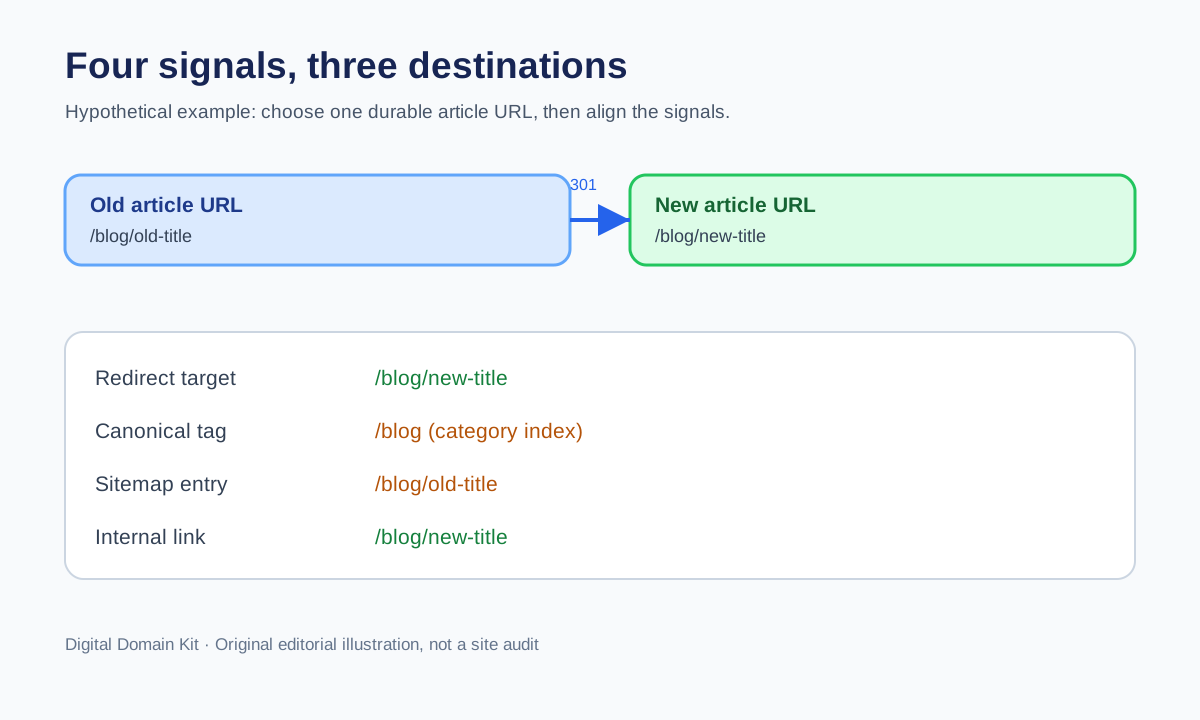
A canonical tag is a preference signal about which URL should represent duplicate or very similar content. A redirect sends a request somewhere else. They can work together, but they can also contradict each other. Imagine a page that redirects from /old-guide to /new-guide, while the destination’s canonical tag points to /guide-index and the sitemap still lists /old-guide. A crawler is being given three different stories. A user may only see the final page, so the contradiction can survive for months.
The practical repair is not to add more tags. It is to decide which URL should be the durable address, then check every signal under your control against that decision. Google says redirects and rel="canonical" annotations are strong canonicalization signals, while sitemap inclusion is weaker. The signals can reinforce each other, but Google can still choose a different canonical if it finds the content or implementation inconsistent. Treat Search Console’s “Google chose different canonical” report as a prompt to investigate, not proof that one tag must be forced into place.

First ask whether the pages really are duplicates
Canonicalization is for duplicate or near-duplicate content. If two URLs answer different questions, give them distinct pages and self-consistent metadata rather than canonicalizing one away. A product page and an overview page may share many words but serve different tasks. A paginated category page may expose items not present on its first page. A country-specific page may contain important local differences. Before treating one URL as the “wrong” canonical, compare the primary content and user intent.
Write a one-sentence purpose for each URL. If a user arriving at the alternate URL would be equally served by the proposed preferred URL, consolidation may make sense. If the new page omits essential information, a redirect is not an equivalent replacement. If both pages need to remain accessible, a canonical may be appropriate only when their principal content is substantially similar and one is genuinely preferred. Google ultimately clusters pages based on content and signals; a tag cannot turn unrelated content into a duplicate.
Build a four-signal inventory
For each URL in the cluster, record four things: the HTTP response chain, any HTML or HTTP-header canonical annotation, sitemap inclusion, and internal links. These are the signals a site owner can usually inspect and edit. Note the exact scheme, hostname, path, trailing slash, and query parameters. A difference between http:// and https://, or between www and the apex, can hide in a report that displays only page titles.
Begin with the Redirect Checker on each candidate URL. Record every hop and final destination. A canonical tag placed in the HTML of a URL that redirects is not the first thing a normal client sees; follow the response to the final page and inspect that page. If a source URL returns 200 rather than redirecting, inspect its own canonical annotation. Do not assume that the CMS settings screen matches the HTML delivered to the public. Themes, plugins, CDNs, and caching layers can alter the final response.
Next inspect page source for <link rel="canonical" href="...">. Check for multiple canonical tags, relative URLs that resolve unexpectedly, staging hostnames, fragments, and query strings. Also inspect HTTP headers if your stack can send a Link canonical header. If HTML and header annotations disagree, resolve that conflict instead of hoping Google will choose the preferred one. The HTTP Headers Parser can help read a captured response header, but the owner must still interpret the intended URL.
Finally, check the XML sitemap and a few important internal links. A sitemap should list the URLs you want discovered as canonical candidates, not an old address that always redirects. Internal navigation, related-article cards, and structured data should also point to the durable destination where practical. Fixing internal links gives users a direct path and reduces dependence on redirects, even though a functioning redirect remains useful for old external links.
Choose one durable destination
A durable canonical URL is stable, accessible, representative, and appropriate for the content. It normally returns a success response, is not blocked by robots rules or noindex, and contains the primary content. Do not point a canonical tag to a page that immediately redirects again, is only available behind a login, or intermittently fails. Confirm the page works in a fresh browser and through a public status check. One line of markup does not rescue an inaccessible target.
If an old URL has permanently moved, a redirect to the durable destination is usually clear. On the final page, use a self-referencing canonical if your platform’s convention calls for it. Put the final URL in the sitemap and update internal links. If two accessible pages must remain for users but carry the same primary content, consider a canonical annotation on the alternate page pointing to the preferred one. Keep their content and intent aligned; do not use canonical as a substitute for deciding which page belongs in navigation.
Do not use both an unrelated redirect and a conflicting canonical as a hedge. For example, redirecting /sale to /products while the products page canonicalizes to the homepage leaves no coherent preferred destination. Decide whether the old sale page is replaced by a relevant new sale page, is simply removed, or should redirect to a genuinely equivalent category. The answer depends on content, not just URL syntax.
Work through a concrete example
Suppose https://example.com/blog/old-title returns a 301 to https://example.com/blog/new-title. The new-title page returns 200 but its canonical tag says https://example.com/blog. The sitemap lists the old-title URL, and a sidebar links to the new-title URL. Search Console reports that Google chose the blog index as canonical for the article. The first check is content: does the new-title page contain a complete standalone article, or is it a short teaser nearly identical to the index? If it is a full article, the canonical tag likely contradicts the intended identity and should be corrected. If it is only a teaser, the report may be reflecting the actual content relationship.
After confirming the full article is the desired URL, update the destination page’s canonical to itself, list that URL in the sitemap, and update internal links to it. Keep the old-title redirect if it represents the same article. Test the complete chain again. Then use Search Console URL Inspection to compare the user-declared canonical with the Google-selected canonical after recrawling. Do not declare success the moment the tag changes in your CMS; verify the delivered page and allow time for recrawl.
Recognize common conflict patterns
Redirect target canonicalizes elsewhere. Sometimes intentional, such as two legacy URLs funneling into one consolidated article. Sometimes a copied template points every article to the category page. Inspect content and the final page before deciding.
Canonical target redirects. A canonical annotation that names an old HTTP URL, an alternate hostname, or a slash variant forces another hop before reaching the intended page. Replace it with the final stable URL where possible. Also review the site-wide URL setting that generated the stale annotation.
Sitemap lists redirected URLs. This often follows a migration where the sitemap generator was not updated. Include current preferred URLs in the sitemap, then keep redirects for old inbound links. A sitemap is not a command to Google, but it should not contradict your stronger signals.
Internal links favor an alternate URL. Navigation may keep sending users through old paths even after a move. Update links you control. This is not merely SEO housekeeping: it helps people share and bookmark the durable URL directly.
Staging or preview hostname appears in canonical tags. This can happen when a site is copied between environments. Check templates and environment variables, then inspect a sample of live pages. Do not publish a production sitemap while canonical tags point to a staging host.
Do not overreact to every Search Console label
A “Page with redirect” observation can be expected for an old URL that correctly redirects. An “Alternate page with proper canonical tag” can also be expected when an alternate accessible page points to the preferred version. The investigation begins when the selected destination is unexpected, a preferred page is excluded, users reach a wrong page, or signals disagree. Prioritize problems that affect important pages and user journeys rather than treating every non-indexed URL as an error to eliminate.
Google may choose a different canonical even when markup is syntactically correct. Its canonicalization documentation says it considers signals including redirects, annotations, sitemaps, HTTPS, and page content. If the page is thin, nearly identical to another, blocked, or inconsistent across versions, inspect those factors. Do not repeatedly flip the canonical tag solely to chase a report while the primary content remains unclear.
Verify the repair as a small release
Keep a before-and-after table: requested URL, old response, old final URL, old canonical, intended final URL, new response, new canonical, sitemap change, and internal-link change. Pick a few representative URLs from the same template to detect a global configuration bug. Verify mobile and desktop HTML if the site serves different markup, and check cached public responses after deployment. One fixed article is not enough if every article template emits the wrong canonical.
Then monitor rather than micromanage. Check public responses after the cache clears, use Search Console URL Inspection for important pages, and watch whether the preferred URL starts receiving impressions. Canonical changes can take time to be discovered and processed. The actionable win is coherent site behavior: one durable URL that serves the right content, with redirects, annotations, sitemap entries, and links telling the same story.
Sources and scope
The signal hierarchy and limitations come from Google’s canonical specification guidance and canonical troubleshooting guidance. Questions in r/SEO about redirect reports and canonical URLs helped identify this practical confusion; the thread is not evidence that a particular fix will work on every site.