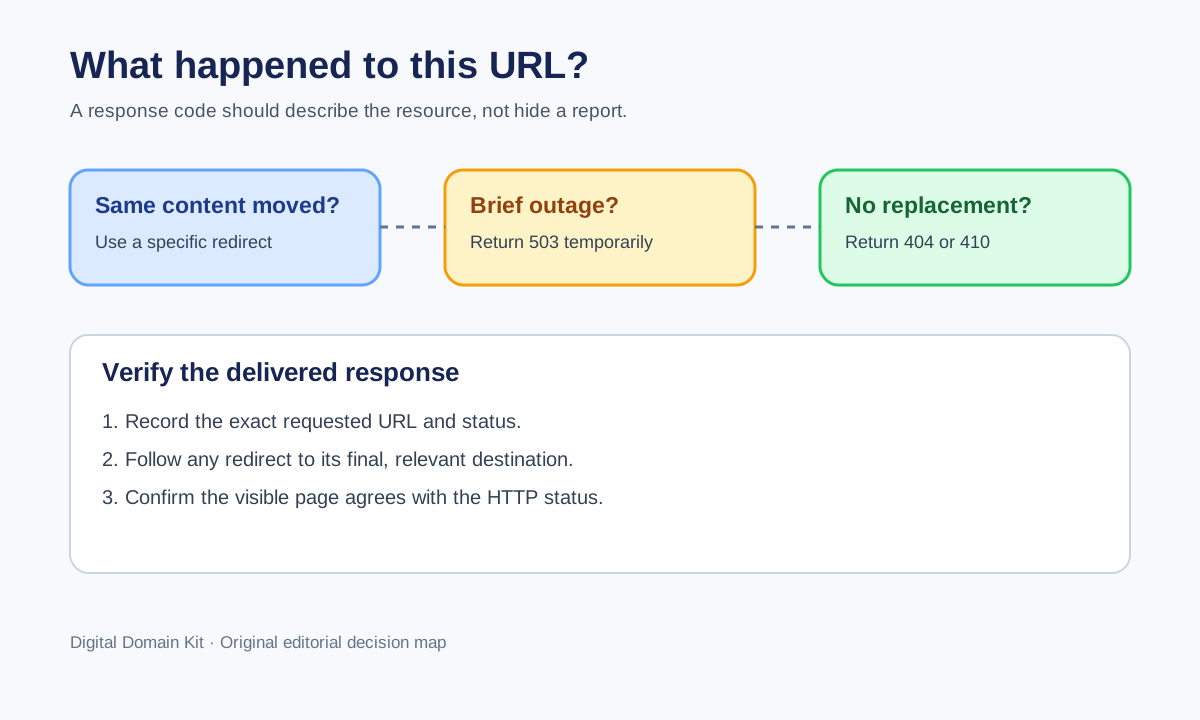
When a URL stops showing its old content, the visible page is only half the story. A visitor may see a polished “not found” message while the server quietly returns 200 OK. A migration may send every missing URL to the homepage. A brief maintenance window may return 404 for pages that still exist. These choices tell browsers, search engines, monitoring systems, and other clients different things. Before changing a status code, write down what actually happened to the resource and what you want people to do next.
This is a narrow operational decision, not an argument that one numeric code always ranks better. Google’s guidance groups both 404 and 410 as appropriate when content has been removed with no similar replacement. For an overloaded server or a short interruption, it recommends a temporary error such as 503. A moved page with an equivalent new destination is a different case: give users the destination, normally with a permanent redirect. The key is to align the response with the truth of the page.

Start with the URL, not the template
Take one exact URL and describe its history. Was it ever a valid public page? Is the content still present under another address? Is its absence intentional? Is the application healthy enough to answer correctly? This matters because a “missing page” may be caused by a stale internal link, a typo, a failed deploy, a removed product, or an outage. Those cases should not be bundled into one generic catch-all rule.
Record the requested URL, the last date it worked, the expected owner, and a representative user journey. A link to an old product manual has different treatment from a random path invented by a bot. Look for incoming links, internal links, a sitemap entry, and recent server logs. If the URL is valuable to people, the best remedy may be restoring it or pointing it to a truly equivalent replacement. Returning a different error number cannot replace that content decision.
Use a redirect when a real replacement exists
If the same page moved to a new URL, redirect the old address to the new one. If an old product page has a current model page with substantially the same purpose, that may also be a useful destination. Do not redirect every missing URL to the homepage merely to avoid a 404 report. A visitor looking for a specific manual or article has not had the request fulfilled by a generic front page. Google calls attention to “soft 404” behavior when a page says it is missing but returns a success response or an irrelevant destination.
Make a mapping for actual moves: old URL, new URL, reason, owner, and review date. Test the old URL with the Redirect Checker to see whether it points to the intended destination and whether the chain introduces needless stops. Then open the destination and confirm its content, not just its status. A one-hop redirect to an unrelated page is still a bad experience. If no appropriate destination exists, do not invent one.
Use 404 when the server cannot find the requested resource
404 Not Found is the normal answer for a URL with no available page. It is appropriate for mistyped paths, never-created pages, and removed content without a matching replacement. It does not mean your entire site is broken. A useful 404 page can explain the problem and offer navigation, search, or a link to a relevant category, while the HTTP response remains 404. The human-friendly design and machine-readable status should agree.
For a retired article, review the decision before deleting it. Some older pages still answer real questions or contain references that users depend on. If the information remains accurate, updating the page may be better than removal. If it is obsolete but useful as an archive, label that context clearly. If it truly must go and there is no substitute, a 404 is honest. The status is not a substitute for checking the content and its audience.
A common implementation error is rendering a 404 template from application code while allowing the framework to return 200 OK. Check the response header with the HTTP Status Code Checker or a command-line request. Then open the page in a browser. Both views matter: the status tells clients what happened; the page tells people what to do. Test at least one deliberately nonexistent URL after every routing change.
Use 410 when removal is deliberate and permanent
410 Gone conveys that the origin knows the resource is no longer available and the condition is likely permanent. It can be a clear fit for a retired feed, a formally removed document, or a resource you are intentionally decommissioning. It is not required merely because a deletion is permanent; Google’s crawling-error guidance accepts both 404 and 410 when there is no similar replacement. Do not promise a magic “faster deindexing” result from switching every 404 to 410. Search systems have their own crawl schedules, and a code change cannot force a timetable.
Reserve 410 for decisions you can explain. If a content editor accidentally unpublishes a page, a 410 rule may overstate the permanence. If the platform makes 410 difficult and your 404 behavior is correct, a well-implemented 404 is preferable to a brittle custom rule. The important distinction is intentionality and operational reliability, not aesthetic preference for a stronger-sounding number.
Use 503 for a short service interruption
503 Service Unavailable says that the server is temporarily unable to handle the request. Maintenance, capacity overload, and a failed upstream dependency can justify it. It should be an actual temporary condition with an owner working to restore service. Do not put a permanently removed page behind a never-ending 503. Conversely, do not return a site-wide 404 during maintenance just because the normal application is unavailable. Google advises against using 403, 404, 410, or noindex as a way to pause a site temporarily.
If you know when service is likely to return, consider an appropriate Retry-After response header. Keep the maintenance page lightweight so the server can still return the intended 503 under load. Check that the status is delivered to both browser and non-browser clients, and verify that an edge cache is not turning an old success response into a misleading answer. A maintenance mode that returns 200 can cause monitors to report “healthy” while the real service is inaccessible.
As soon as the site recovers, retest a few representative URLs and the deliberately missing path. A restored homepage does not prove that article routes, assets, forms, or API endpoints recovered. Leave a short incident record: time, affected URL patterns, observed statuses, and whether the problem was at the origin, CDN, or application. This gives the next responder a useful baseline.
A small decision worksheet
For each affected URL, answer these questions in order. Is the page still available at that address? If yes, return the content normally and fix any false monitoring alarm. If not, is the same information available at a clearly equivalent new URL? If yes, make a specific redirect. If not, is this only a short outage? If yes, return 503 while restoring the service. If not, has the content been intentionally and permanently retired? If yes, use 404 or 410 according to your system’s conventions. If you cannot answer the questions, hold off on a mass rule and find the content owner.
The worksheet prevents a bad bulk fix. “All missing pages go to the homepage” collapses unrelated cases. “All errors are 503” hides content removal. “Everything old gets 410” can erase valuable migration paths. It is reasonable for one site to use all of these responses at once, because different URLs represent different states.
How to test the result without guessing
Build a four-row test set: a working page, a deliberately invalid path, a known moved page, and, if available, a URL affected by maintenance. Record the exact URL and timestamp. Run the public URL through the status checker and record its observed response. For redirects, use the redirect checker to inspect the destination. Open each page normally as well. A checker cannot judge whether a destination really answers a reader’s question.
Be careful with caches and proxies. Your browser might have an old redirect cached, while the edge has a newer rule and the origin has a third answer. If results differ, capture the complete response chain and the network from which you tested. Avoid repeatedly changing server rules because one cached result has not yet expired. Record your intended rule, its deployed version, and a verification point from a fresh session.
After deployment, inspect internal links and the sitemap. A removed URL should not keep appearing in prominent navigation or a current XML sitemap. A moved URL should be linked directly at its new address wherever you control the link, even if its old redirect works. For a temporary outage, do not remove the page from navigation or sitemap simply to make a report look cleaner; restore availability instead.
When Search Console looks alarming
A “Not found” report is not inherently a site-wide emergency. It can include old URLs, typos, and external links you never controlled. Prioritize URLs that should still work or have meaningful user demand. If an expected page returns 404, investigate routing and publication state. If the page moved, verify the mapping. If removal was intentional and no replacement exists, document that decision and move on. Google’s reports are observations, not instructions to redirect every error.
Google’s canonical and crawl systems may take time to revisit changed URLs. Do not repeatedly toggle codes to chase an immediate report change. First verify your server response and the actual destination. Then monitor whether the expected URLs are being crawled and indexed over time. A stable, truthful response is more useful than a sequence of reactive changes that creates inconsistent signals.
Close the loop with ownership
Give every bulk status-rule change a review owner. Record which URL patterns it covers, why the behavior is appropriate, a sample of exact URLs tested, and a rollback path. Application routers often use broad wildcard rules; one careless change can make a whole section vanish or redirect. A small representative test set is not enough for a large migration, but it is an indispensable first check before release.
The practical rule is simple: redirect when a real destination exists, use 404 or 410 when it does not, and use 503 only when the service is temporarily unavailable. The work is in proving which situation you have and verifying the response that actually leaves your server.
Sources and scope
This decision framework follows Google Search Central’s crawling-error guidance and its temporary-site-pause guidance. A migration discussion on r/SEO illustrates why mixed 404 and redirect reports prompt confusion; it is topic evidence, not a technical authority. The status choice must be checked against your own server behavior.