A cron expression is compact enough to fit on one line, which is exactly why it can hide an expensive mistake. A job intended for a weekday morning may run on weekends; a backup might overlap with itself; a task that worked in summer shifts after daylight-saving time because the host uses another timezone. Reliable scheduling is less about memorizing symbols and more about making the timing, environment, and failure behavior explicit.
This guide explains a practical method for designing recurring jobs. It is useful for developers maintaining a server, site owners reviewing an automation, and anyone translating a plain-language requirement into a cron schedule. Start with Digital Domain Kit’s Cron Generator to build or check the expression, but treat the generated line as the beginning of the review—not proof that the job is safe to run.
What cron does and does not do
On Unix-like systems, the cron daemon wakes up at regular intervals and starts commands whose schedules match the current time. A traditional user crontab has five time fields followed by a command: minute, hour, day of the month, month, and day of the week. Some environments add a seconds field, aliases, or their own syntax. Always verify the implementation on the actual platform before copying an expression from a blog post or another service.
Cron answers “when should this command be started?” It does not guarantee that the command succeeds, finishes before the next run, has the correct environment, or sends useful alerts. Those operational concerns need their own design. The crontab manual page is the primary reference for common Linux crontab behavior, while managed platforms often document different conventions.
Read the five fields from left to right
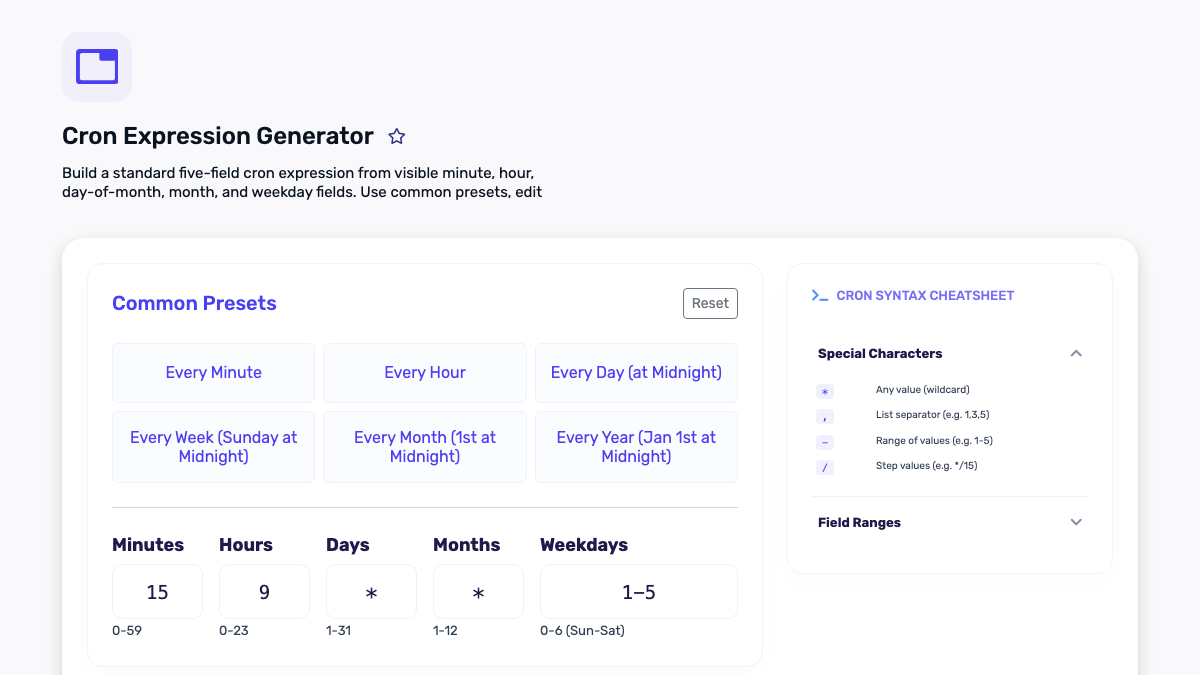
15 9 * * 1-5 /path/to/command
In a typical five-field crontab, this example means “run at minute 15, hour 9, on every day of the month, every month, when the day of week is Monday through Friday.” The fields are not a natural-language sentence, so write the intended sentence beside the expression in your documentation. That single habit catches many errors during review.
- Minute: usually 0–59.
- Hour: usually 0–23 in the server’s configured timezone.
- Day of month: a calendar day such as 1 or 15.
- Month: commonly 1–12 or an implementation-supported name.
- Day of week: commonly a numeric or named weekday; confirm whether Sunday is represented by 0, 7, or both in your implementation.
Lists, ranges, and steps make schedules more precise. 0,30 * * * * runs on the hour and half-hour. 0 8-18 * * 1-5 runs at the top of each hour from 08:00 through 18:00 on weekdays. */15 * * * * runs every 15 minutes. A step is not “exactly 15 minutes after the last successful job”; it is a match against the clock. That distinction matters if a run takes longer than expected.
Translate a requirement before writing syntax
Write the human requirement first, including the timezone and exception rules. “Send the daily report every day” is incomplete. “Start the report at 09:15 America/New_York on weekdays, except company holidays, and alert the operations mailbox on failure” is a reviewable requirement. It may not all fit in cron, but it tells you what cron must do and what the application or monitoring system must handle.
Then use the Cron Generator to select the fields. Read the generated expression back as a sentence. A second person should be able to verify the requirement without guessing whether “9” means morning, evening, local time, or UTC. If your team uses a different scheduler—such as a cloud provider, CI service, or framework scheduler—translate the same requirement into that system’s documented timezone and syntax rather than assuming it accepts crontab format.

The day-of-month and day-of-week trap
The interaction between the day-of-month and day-of-week fields is a frequent source of surprise. In many cron implementations, when both fields are restricted rather than wildcards, a command may run when either field matches. That means an expression intended to mean “the first Monday of the month” can also run on every first day and every Monday. The exact behavior is implementation-specific enough that you should consult your cron documentation and test with representative dates.
For rules such as “the first business day,” “the last day of the month,” or “skip public holidays,” use a small script or application scheduler that understands the calendar, then let cron invoke it on a simple, safe cadence. The script can decide whether work should happen and log its decision. This is clearer than attempting to force a complex business rule into a terse expression that nobody will want to change later.
Timezones and daylight-saving time need an owner
A server may run in UTC while a business deadline is stated in local time. Either choice can be correct; ambiguity is the risk. Store the intended timezone beside each schedule. If the job controls a customer-facing event, name the timezone in the product requirement and in the runbook. A schedule at 09:00 UTC is not the same as a schedule at 09:00 Eastern Time.
Daylight-saving transitions create two special cases: a local time can occur twice in autumn and may not occur at all in spring. The cron manual warns that jobs scheduled during these transitions can run twice or not run, depending on the local clock change. For a task where duplicate execution is harmful, build idempotency or locking into the job. For a task where missing the run is harmful, add monitoring and a compensating check. Do not assume the scheduler will solve a business-critical time anomaly for you.
Prevent overlapping runs
Imagine a job scheduled every five minutes that sometimes needs eight minutes to finish. Cron can start a second copy while the first is still working. The result may be duplicate emails, two processes editing the same export, an overloaded database, or corrupted temporary files. Before choosing the interval, measure a realistic upper-bound duration and decide the overlap policy.
Common safeguards include a lock file with safe cleanup, an operating-system locking utility such as flock, a database or queue lock, and application-level idempotency keys. The appropriate mechanism depends on where the task runs and whether more than one server can execute it. A lock should be observable: log that a run was skipped because another instance was active, and alert if the lock persists unusually long. Silent skipping can be as difficult to diagnose as duplicate work.
Use an explicit environment and absolute paths
Interactive shell settings do not automatically apply to cron. Commands that work in a terminal may fail because PATH, the current directory, language runtime, credentials, or configuration variables differ. Use absolute paths to executables and working directories where appropriate. Set only the environment variables the job actually needs, and keep secrets in the platform’s secret-management mechanism rather than pasting them into a public or widely readable crontab.
Redirect standard output and errors deliberately. Cron may mail output locally if mail is configured, but that is not a dependable alerting plan for modern infrastructure. Log structured start, completion, duration, result, and error information in a location your team can inspect. Add an external health check or monitoring alert for jobs whose completion matters. The goal is not more notifications; it is a clear signal when a scheduled responsibility has not been fulfilled.
Test the command separately from the schedule
First run the exact command manually in a safe environment with the same user and environment assumptions that cron will use. Confirm what it changes and how it reports failure. Next, temporarily schedule it for a near-future time or use a harmless test mode, then inspect the logs. Finally, test the recovery case: a missing dependency, denied permission, timeout, or existing lock. A scheduler that starts a command is only one part of a reliable workflow.
For web maintenance tasks, pair scheduling review with simple checks. If a job publishes content or rebuilds a sitemap, verify the resulting page and sitemap URL after the test run. If it refreshes a report, confirm the report’s timestamp and source data. Digital Domain Kit’s Website Status Checker can provide a quick external availability check, while your application logs should remain the authority for what the scheduled job did.
A maintainable schedule record
Every recurring task should have a short record: its plain-language purpose, schedule and timezone, owning team or person, command or scheduler location, expected maximum runtime, overlap policy, expected output, alert destination, and last review date. A link to a runbook is valuable for tasks that publish content, touch billing data, back up systems, or rotate keys. This is not bureaucratic overhead. It makes it possible to safely change an automation months later when the original author is unavailable.
Review schedules after server moves, runtime upgrades, timezone-policy changes, application scheduler upgrades, and changes to the task’s business purpose. Remove jobs that no longer have an owner. A disabled or forgotten cron entry can be a security and reliability risk; a documented job with a clear owner is much easier to maintain.
Cron review checklist
- State the schedule in plain language with a timezone.
- Verify the platform’s cron syntax and day-field behavior.
- Read the expression back against the requirement.
- Use calendar-aware code for business-day or holiday rules.
- Estimate runtime and define an overlap policy.
- Use explicit paths, minimal environment variables, and safe secret handling.
- Log starts, finishes, duration, failures, and skipped/locked runs.
- Test the command, the scheduled invocation, and a failure scenario.
- Document ownership, alerting, and a review date.
A readable schedule is a good start. A reliable schedule also has a clear timezone, a safe command, protection against overlap, useful monitoring, and a human owner who can explain why it exists. That is the difference between an expression that happens to run and an automation you can trust.
Primary sources and further reading
- crontab(5) Linux manual page
- RFC 5545: Internet Calendaring and Scheduling Core Object Specification (calendar terminology and recurrence context)
- GNU mcron manual: crontab file format