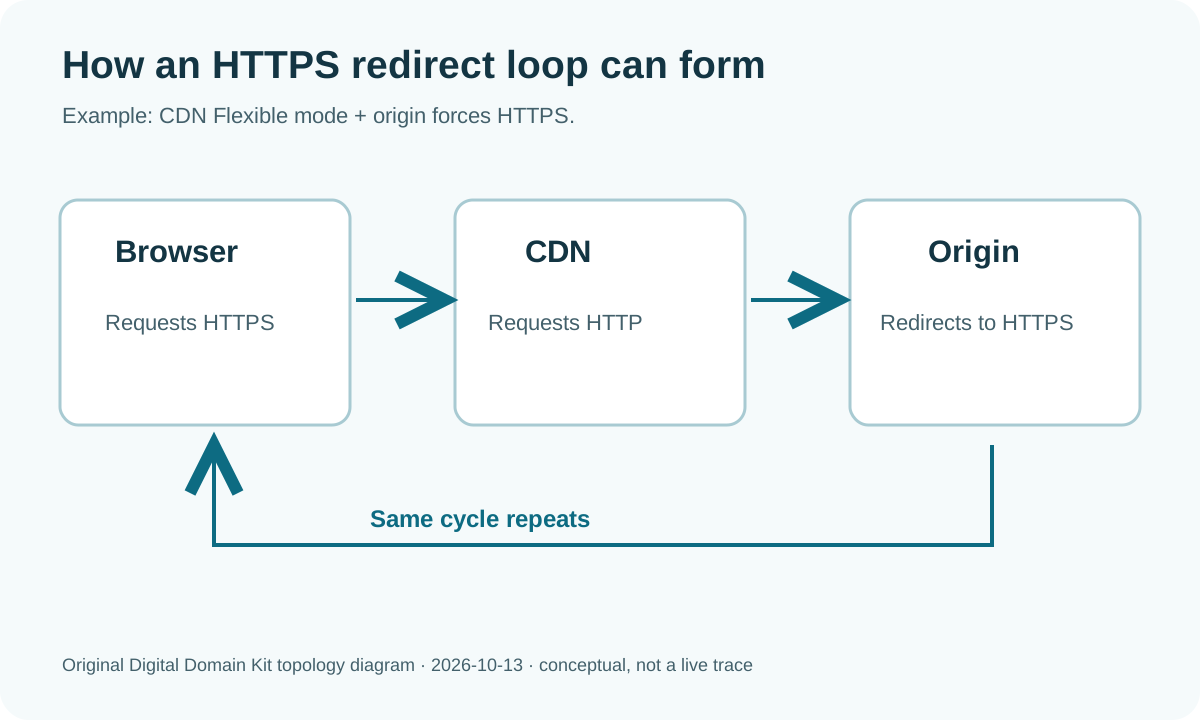
You turned on HTTPS at a CDN, changed a WordPress address, or added a “force secure” rule, and the site now says ERR_TOO_MANY_REDIRECTS. The browser may suggest clearing cookies. That can help with a session-specific loop, but a repeatable loop across fresh browsers usually means servers are sending the request back and forth. The useful question is not “which redirect feature should I enable next?” It is “which layer issued each redirect, and what did that layer think the request scheme and host were?”
A Cloudflare support discussion describes a loop after adding a domain, while a WordPress/CDN discussion reports the error after switching the application URL to HTTPS. They are examples of why this is a recurring reader task, not evidence that every loop has the same cause. The steps below use provider documentation and an observable redirect trace.
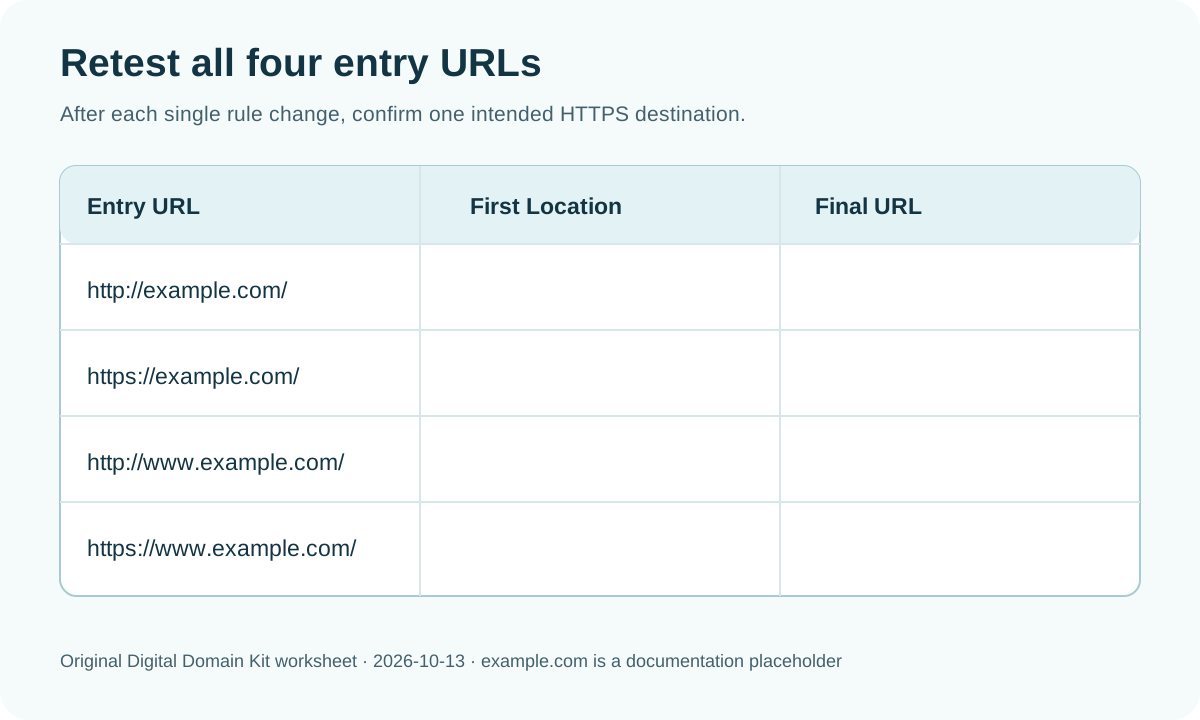
Short answer: Capture the chain for all four entry URLs—HTTP and HTTPS, with and without www. If an HTTPS visitor repeatedly receives a redirect to the same HTTPS URL, inspect how the proxy connects to the origin. On Cloudflare, Flexible mode connects to the origin over HTTP; if the origin insists on HTTPS, the two rules can loop. If the hosts alternate instead, inspect competing www rules. Change only the conflicting layer after verifying the origin supports the intended HTTPS mode.
Preserve evidence before changing settings
Write down the failing exact URL and the time. Try it in a private window and on a second network. If only one signed-in user loops, investigate application cookies and session settings later; if everyone loops, start with server redirects. Save the current CDN encryption mode, edge redirect rules, origin web-server rules, and application base URL. A screenshot or configuration export gives you a way back if a change makes the site less accessible.
Use the Digital Domain Kit Redirect Checker for each entry URL. Record every status and Location target. If the tool stops at a hop limit, that is still useful: look at the first repeated URL or repeated pair. A terminal test can supplement it:
curl -I http://example.com/
curl -I https://example.com/
curl -I http://www.example.com/
curl -I https://www.example.com/
These commands deliberately do not follow redirects so you can inspect each first hop. Use curl -IL --max-redirs 10 https://example.com/ for a bounded chain. Some applications answer HEAD differently from a browser GET, so confirm surprising results in the browser or with a GET request. Do not paste customer cookies, authorization headers, or private URLs into a public tool.
When you record a hop, include the status code and complete Location value, not only “redirected.” A relative path such as /login resolves against the current host, while an absolute URL can switch both host and scheme. Repeatedly seeing the identical URL is different from a two-URL alternation. If a chain includes a 200 page before the browser later redirects with JavaScript or a meta refresh, the HTTP-only checker may stop there; inspect the loaded page and console as well. This distinction prevents blaming the CDN for an application-side navigation.
| Repeated pattern | Likely conflict | Check first |
|---|---|---|
| Same HTTPS URL repeats | Proxy sends HTTP to an origin that redirects to HTTPS | CDN encryption mode and origin HTTPS rule. |
www and apex alternate | Competing host-preference rules | Edge, host, and application canonical-host settings. |
| Login and homepage alternate | Application/session logic | Cookies, trusted proxy headers, login redirect. |
| Only one path loops | Path-specific rewrite or plugin | Rule priority and application routing for that path. |
The table narrows the search; it is not a diagnosis without the actual hop trace. A CDN can send a generic error page that obscures the origin response, and application redirects can depend on cookies. Keep the trace and compare it with the rules you own.
Understand the browser–proxy–origin path
With a reverse proxy or CDN, a visitor’s browser connects to the proxy, which then connects to the origin web server. Those are two separate connections. A browser can use HTTPS to reach the proxy while the proxy uses HTTP to reach the origin. Cloudflare’s Flexible encryption documentation explicitly says it connects to the origin over HTTP and warns that an origin forcing HTTP requests to HTTPS creates a redirect loop. The origin redirects, the proxy asks over HTTP again, and the origin redirects again.

If this is your setup, inspect the origin’s certificate and HTTPS availability before changing the CDN to Full or Full (strict). Full (strict) requires an origin certificate meeting Cloudflare’s validation requirements. Cloudflare’s too-many-redirects guidance connects encryption-mode mismatches and conflicting redirect rules to the browser error. It is not safe to select a mode blindly: a mode requiring HTTPS at an origin that cannot serve HTTPS will make the site fail differently. Have the host issue or repair the origin certificate if necessary.
For a managed host, the public dashboard may not reveal origin certificate details. Ask support whether the origin currently answers HTTPS for your domain, what certificate is presented there, and whether its own HTTP-to-HTTPS redirect can remain enabled with the chosen proxy mode. Keep the support question specific: provide the failing hostname and the repeated two or three hops, but not private keys. If the origin is reachable directly, avoid publishing its address or bypassing access controls in an attempt to test it. The host can perform that check in its own environment.
Do not use “turn off HTTPS everywhere” as the final fix. It may stop the visible loop by removing a security layer, but it leaves visitor or origin traffic exposed. Aim for a coherent end state: browser-to-proxy HTTPS, proxy-to-origin HTTPS where supported, a valid origin certificate, and one clear HTTP-to-HTTPS redirect. The correct place for that redirect depends on the stack and provider setup, but the rule must not see the same insecure request repeatedly.
Check host redirects independently from scheme redirects
A loop can alternate example.com and www.example.com even when HTTPS is configured correctly. One layer may enforce www, while the origin or CMS removes it. Inspect the Location header at each hop. Decide which hostname is canonical for visitors, then align edge rules, web-server rules, and application base URL with that choice. One layer can perform the permanent redirect; the others should recognize the final host as already correct.
Check whether a rule matches too broadly. A “redirect all requests to HTTPS and www” edge rule should exclude requests that are already on HTTPS and www; otherwise it may issue a self-redirect. Likewise, an old migration rule could redirect the new domain back to the old domain while the old domain redirects forward. Cloudflare’s troubleshooting page specifically recommends reviewing Redirect Rules and Page Rules for conflicts. If you have several rule systems, record their priority order rather than assuming the most recently added rule wins.
Use the DNS Lookup only to confirm that the host resolves to the intended proxy or origin; DNS itself does not issue HTTP redirects. If the two hostnames point through different services, that can explain why each service enforces a different preferred host. Still, do not edit DNS until you know which address should serve each hostname. Redirects are HTTP responses, so the immediate evidence is the chain, not a DNS propagation graphic.
Check the application’s idea of HTTPS
Applications often generate absolute URLs based on their configured site address and on request headers from a reverse proxy. If the origin sees an HTTP connection from the proxy but the visitor used HTTPS, the application needs a trustworthy way to know the original scheme. A missing or untrusted forwarded-protocol setting can make the app send a visitor back to HTTPS on every request. Configure trusted proxies according to your framework and host documentation, limiting trust to actual proxy addresses. Do not simply accept spoofed forwarding headers from the open internet.
In WordPress, compare the WordPress Address and Site Address with the intended public HTTPS hostname. Also inspect HTTPS or redirect plugins, host-panel “force HTTPS” switches, web-server rewrite files, and CDN rules. Avoid toggling all of them at once. Disable or adjust one conflicting rule, re-run the same four-entry test, then record whether the repeated hop disappeared. If the admin interface is inaccessible, use the hosting provider’s supported recovery path rather than editing a production database value without a backup.
Not every redirect loop is a proxy-encryption problem. A login loop can result from a cookie domain mismatch, session expiry, or a rule that sends unauthenticated users to a page that itself requires authentication. A path-specific loop can come from a rewrite that matches its own destination. If your trace alternates two application paths rather than schemes, investigate those application rules first. The browser’s generic “too many redirects” message does not identify the responsible layer.
Recover carefully if the site is live
If a public site is currently inaccessible, prioritize a reversible change. Save a copy of the current rule or configuration, disable the most recently added conflicting redirect, and test again. If the proxy supports a development or bypass mode, understand exactly what it changes before using it: bypassing a proxy may expose a different certificate or IP and should not become a permanent workaround. Ask the host or CDN support for the specific loop trace and timestamps if you cannot isolate the layer.
Once the site loads, do not stop at the homepage. Test /, an inner page, login or contact routes, and both host variants. Inspect the final scheme and content, not only the status code. A 200 from a generic host setup page is not success. Check forms, cookies, and static assets under the chosen HTTPS host. Update internal links and canonical tags later if they still point to the discarded variant, but keep that SEO cleanup separate from the emergency access fix.
Final verification checklist
- Capture the failing chain and identify the first repeated URL or pair.
- Confirm CDN encryption mode and whether the origin serves HTTPS with a valid certificate.
- Choose one public hostname and align edge, host, and application settings.
- Remove or narrow self-matching and contradictory redirect rules.
- Test HTTP/HTTPS on both apex and
wwwafter each single change. - Verify inner pages and application actions reach the intended HTTPS host without a loop.
For a correction to this guide, use the Digital Domain Kit contact page. A public URL and a redacted redirect trace can help; never send credentials, private cookies, or origin secrets.
Sources and review method
Reviewed October 13, 2026 against Cloudflare’s Flexible-mode documentation and redirect-loop troubleshooting guidance. The two Reddit discussions above informed the scenario only. The diagrams are original explanatory graphics; we did not access a reader’s CDN account, alter a production encryption mode, or claim that one setting fixes every redirect loop.