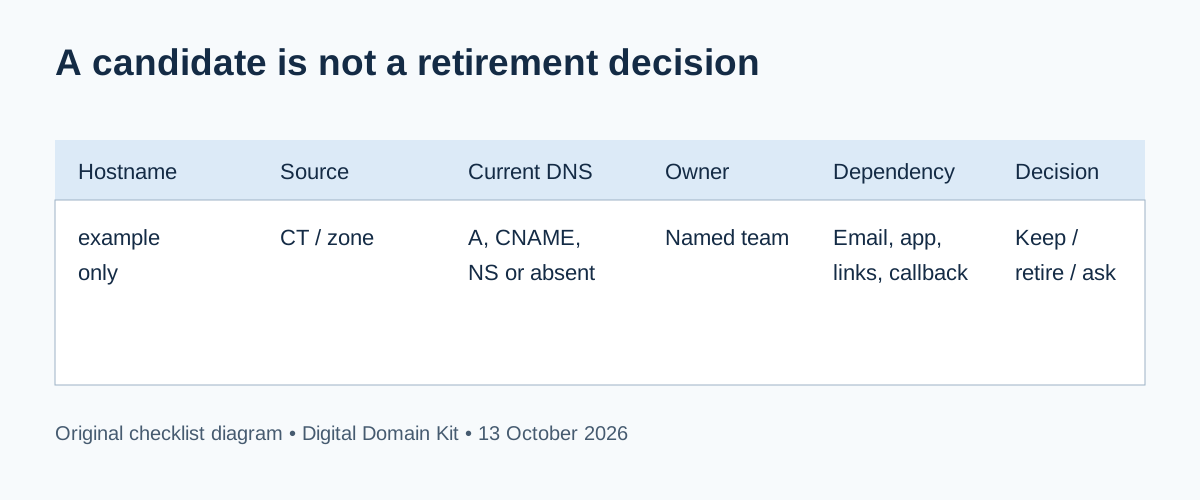
You inherited a domain with names like old-shop.example.com, beta.example.com, and files.example.com. Some return an error. One points to a service nobody remembers buying. Is it safe to delete the records? Possibly—but an error page is not a retirement approval, and a DNS name can support email, callbacks, certificates, or bookmarked links without showing a busy homepage. The job is to turn public candidates into an owned inventory, check dependencies, and remove truly obsolete pointers before deprovisioning the resources behind them.
A DNS governance discussion in r/sysadmin describes thousands of old names without clear owners. Another discussion about dangling DNS entries asks why deprovisioned third-party resources remain reachable from trusted domains. These are useful examples of the operational problem, not prevalence statistics or proof that any particular service is claimable. OWASP's prevention guidance supplies the technical basis for the careful sequence below.
Short answer: Work only on domains you own or are authorized to administer. Gather candidate names from your DNS zone, service inventory, certificate records, and public discovery. Verify current DNS and ownership. Check traffic and integrations. For a name that should be retired, transition visitors if needed, update or remove its DNS pointer, wait through the relevant cache window, and only then delete a third-party resource that might be claimable. If the owner or dependency is unclear, keep it in an investigation state.
Define the scope before collecting names
Start with the registered domain and the exact zones you control. A large organization may delegate a subdomain to another team or provider; a DNS record below the parent does not automatically give you authority to test that team's application. List the owner, the DNS provider, and the people who can approve changes. If you are an agency or contractor, record the client's authorization and boundaries. This guide is about maintenance of your own assets, not probing unrelated hosts for security weaknesses.
Keep collection passive where possible. Export the authoritative DNS zone or review provider records first because those are the names your organization currently publishes. Add names from your registrar, hosting accounts, CDN configuration, analytics, email settings, repository infrastructure files, and certificate logs as candidate evidence. Public certificate logs can contain historical names; a name in a log does not prove it resolves today. Wildcard certificates can also obscure the individual hosts actually used. A search result is a lead, never the whole inventory.
Use the Digital Domain Kit Subdomain Finder to generate public candidates for a domain you control. Keep the source and date for each result. The tool's public-source view cannot prove completeness, ownership, current use, or whether a name is safe to visit. Run the DNS Lookup on selected hostnames for its supported record types; use the DNS Propagation Check with CNAME selected when you need a public CNAME answer. For authoritative certainty, compare with the record in the active DNS provider's zone rather than relying on a single recursive resolver, which may still have a cached answer.

Make one row per hostname and one accountable owner
A small spreadsheet or issue tracker is sufficient. For each candidate, record the exact hostname, how it was discovered, whether it currently resolves, its A/AAAA/CNAME/NS target, the service or IP that target belongs to, the business owner, known users, and a proposed decision: keep, transition, retire, or investigate. Add a last-verified date and a link to the change ticket. If several records form a CNAME chain, preserve the full chain. A target name that belongs to an old vendor is a clue, but not a vulnerability verdict.
Pay attention to delegated NS records. A subdomain may be a separate DNS zone managed by another team, so editing the parent record can disconnect many names at once. MX, TXT, and SRV records may reveal mail routing, verification, or service discovery that a simple web check misses. Wildcard DNS can make random names resolve even when there is no individually configured record. Mark these cases clearly instead of treating every resolution as an independent live website.
| Finding | What it may mean | Next owner check |
|---|---|---|
| Current CNAME to an active service | Possibly a live integration | Confirm resource account and purpose. |
| CNAME to a deleted service | Potential dangling record | Check provider-specific claim rules; prioritize remediation. |
| No DNS answer, historical certificate name | Old name or intentionally retired | Check links and inventory before closing. |
| Wildcard answer | One parent rule may cover many names | Review proxy host allowlist and need. |
| Delegated NS record | Another zone may own many records | Contact delegated zone owner. |
Do not use a generic “vulnerable” label just because a CNAME target does not resolve. OWASP's testing guide distinguishes a dangling pointer from actual provider-specific claimability. Some services require domain verification or prevent another account from claiming a hostname. You still need to clean obsolete records, but overstating a takeover finding can send a team into an unnecessary incident response while overlooking the real dependency.
Check dependencies before retiring a name
Ask the service owner whether the hostname appears in application configuration, OAuth redirect allowlists, webhooks, email templates, mobile app settings, API clients, uptime checks, and published links. Search your own documentation and repositories. Look at recent traffic or access logs if you control the endpoint, but respect retention and privacy rules. No hits in one week does not prove a name is unused: a monthly report, password-reset link, or rarely used customer integration may not appear in a short sample. Choose a review window that fits the business process.
Inspect the public web response only for names within your authorized scope. The HTTP Status Code Checker can show whether a URL responds, and the Redirect Checker can show a chain that still directs visitors to an old hostname. A 200 page may be a vendor placeholder; a 404 may still be an active service with a missing path. A certificate does not prove active ownership or intended use. Combine these observations with the owner and resource account.
When a name has no known owner, do not silently delete it. Mark it “owner unknown,” ask the teams that manage the DNS zone, hosting account, application, and marketing links, and time-box the search. If it points to an already deleted service, prioritize the risk review while you identify the owner. If you discover an unexpected page or evidence of an actual takeover, follow your incident process: preserve evidence, restrict access to the details, and urgently remove or redirect the record under change control. Do not attempt to claim an external service as a test unless authorized and required by your security team.
Use a safe retirement sequence
Once an accountable owner approves retirement, decide what users should experience. If bookmarks or search results still reach the hostname, a redirect to a relevant live page or an owned maintenance page can make the transition less abrupt. Do not redirect every old name to the homepage merely for SEO; a misleading destination is poor for users. For an obsolete API or callback endpoint, coordinate client changes first because a browser redirect may not serve those clients. Keep a rollback plan that points only to infrastructure you still control.
OWASP recommends updating or removing the DNS record before deleting a claimable cloud resource. This order closes the dangling-pointer window. After the DNS change, verify the authoritative answer and allow for resolver caches based on the previous record's TTL and your provider's behavior. Only then deprovision the old resource, unless the security team has a more urgent containment plan. Save the old record value and ticket so an approved rollback is possible; avoid pasting secrets into that ticket.
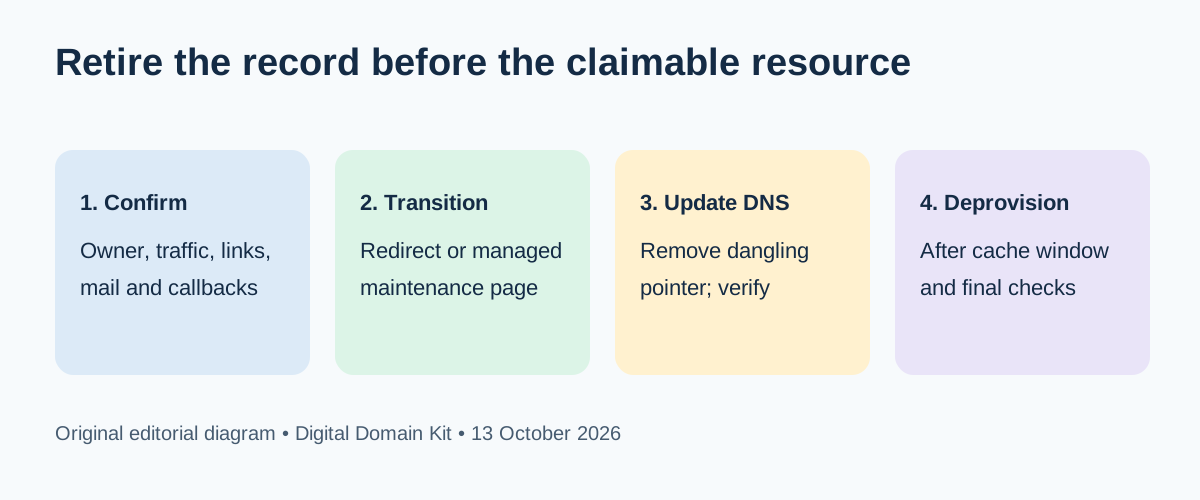
Verify from more than one viewpoint after the change. Check the authoritative DNS zone, then a public resolution path after the relevant cache window. Open any planned redirect or maintenance page in a browser and inspect its certificate. Re-run important email, webhook, and login flows that depended on the name. Remove the hostname from monitoring and configuration only after you know whether a failure alert would still be useful during the transition. Update the inventory's status and review date instead of deleting its history.
Handle wildcard names and delegation carefully
A wildcard record such as *.example.com can send unlisted names to the same service. OWASP notes that wildcards increase the risk of forgotten names and recommends narrow scope and host allowlists if they are necessary. Before removing one, identify whether active applications rely on dynamically generated subdomains. Before keeping one, verify the receiving proxy rejects unknown hostnames and that the backing resource cannot be claimed after deletion. A wildcard makes passive inventory less complete because many plausible names will appear to resolve.
Delegated NS records need a different conversation. The parent zone may contain only the delegation, while the actual A, CNAME, MX, and TXT records live with another provider. A failed public web response does not justify removing that delegation. Contact the team or vendor responsible for the child zone and document their inventory. If the delegation itself is obsolete, coordinate the removal with that owner and check for mail and validation records before changing the parent zone.
Turn one cleanup into a repeatable process
The inventory is most valuable when every new DNS record has a named owner, purpose, resource ID, creation date, and expected review date. Require the person deleting a service to update DNS as part of the same decommissioning checklist. Review public records periodically, compare DNS targets with active cloud resources, and investigate changes to certificate issuance for sensitive hosts. A small site can do this quarterly and after each migration; a larger fleet may automate comparison more frequently. The cadence should match change volume and risk, not an arbitrary scanner badge.
Keep findings proportionate. “This historical name appears in a certificate log” is not the same as “the name resolves.” “The CNAME target returns an error” is not the same as “an attacker can claim it.” “The service account is gone while DNS still points to it” is the kind of evidence that justifies a focused provider-specific review and urgent cleanup. This wording helps owners act on facts and avoids turning harmless historical data into alarm.
Final retirement checklist
- Confirm authority to review and change the exact zone.
- Collect candidates from current DNS, owned service records, and labeled public sources.
- Record current answers, resource target, owner, dependencies, and verification date.
- Classify each name as keep, transition, retire, or investigate; do not infer safety from a web error.
- Obtain owner approval and plan user, email, API, and callback transitions.
- Update or remove DNS before deprovisioning a potentially claimable service; verify after the cache window.
- Recheck the intended user experience and preserve the change history.
Sources and review method
Reviewed October 13, 2026. The retirement order and risk model were checked against the OWASP Subdomain Takeover Prevention Cheat Sheet and the OWASP testing guide. Reddit discussions were used to identify inventory and ownership questions. We did not enumerate a customer domain, access a provider account, claim a hostname, or test a specific takeover. Both visuals are original explanatory diagrams, not evidence of a live scan.
Found a stale technical claim or an unclear step? Send a correction with the public source and date. Do not include private zone exports, tokens, or exploit details in the contact form.