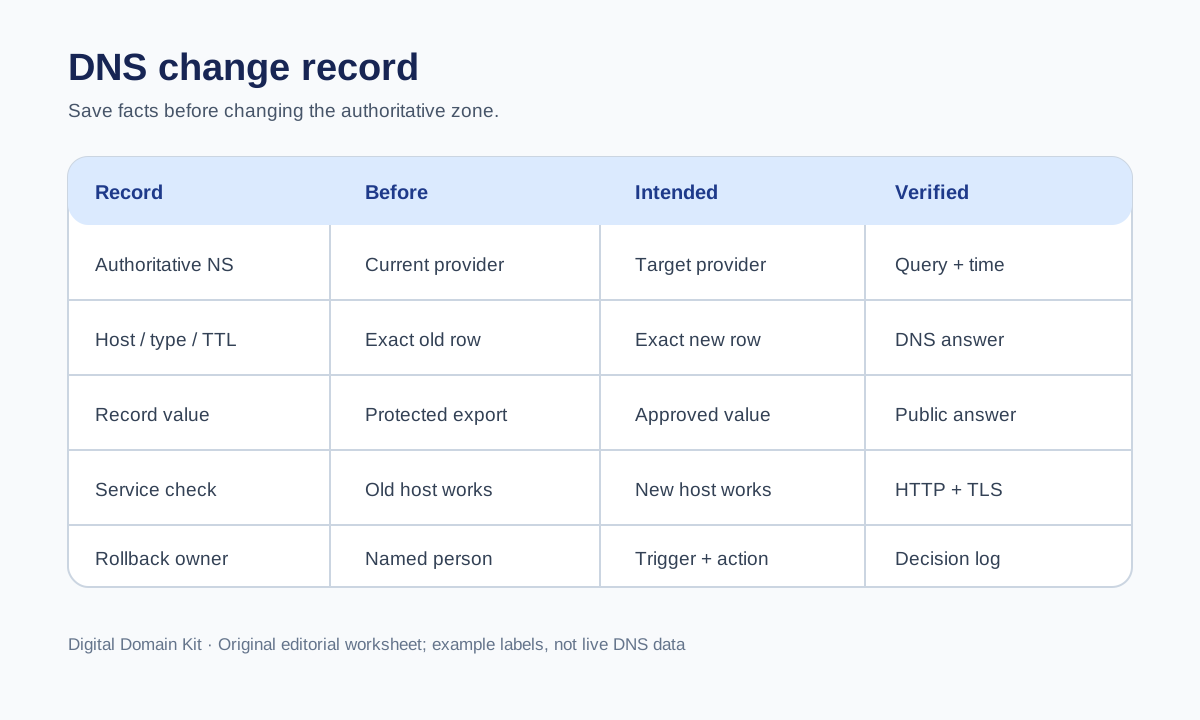
Most DNS change mistakes are not about remembering whether an A record takes an IPv4 address. They happen when a team cannot reconstruct what was there before, changes the wrong zone, or assumes a new DNS answer proves the entire website works. A small change record is more useful than a heroic memory of the old setup. It should let another person answer three questions: what changed, how was it verified, and how can we safely return to the previous state if needed?
This article describes a change log for a site you operate. It is intentionally narrower than a general explanation of DNS. The record is not a copy-paste template for every provider: each host, record type, email service, CDN, and certificate setup has its own constraints. Its value is that it forces the owner to capture facts before touching a control panel.

Identify the DNS zone that actually answers
Before changing a record, confirm which nameservers are authoritative for the domain. The registrar may show where a domain was registered, but that does not mean its DNS editor is active. A domain can use the registrar’s nameservers, a CDN provider’s nameservers, or a managed host’s. Editing an inactive zone can create a convincing-looking control-panel change that has no public effect. In the change record, include the registered domain, the current authoritative nameserver set, the DNS provider account, and the person who has permission to edit it.
Use the DNS Lookup Tool to observe current public nameserver and record answers. Compare those observations with the authoritative zone in the provider dashboard. If they disagree, pause. A cached answer, a staged but inactive zone, or a delegation change may explain the difference. Do not call the work complete just because a form says “saved.” Record the exact host name: @, a blank apex field, www, and a fully qualified name are not interchangeable labels in all dashboards.
Capture the complete before state
For each affected record, save the name, type, value, TTL, and any provider-specific routing or proxy setting. Include relevant neighboring records when a web move might affect them. An A record for the apex might coexist with an AAAA record, while www might be a CNAME. A backup that records only the IPv4 address cannot restore the old behavior if the IPv6 path or proxy setting also changes. Take an export if the provider offers one, but write the critical rows into the change log so they remain understandable without opening a proprietary file.
Do not casually include secrets in the document. DNS TXT records sometimes contain verification tokens or policy information. Save the values in an access-controlled operations system, not in a public article, ticket, or screenshot. Record who can retrieve the original values and where the protected export lives. The change log can say “DKIM selector preserved in restricted export” without publishing the selector value to an unrelated audience.
Capture a baseline of application behavior too: current homepage response, one deeper page, current redirect path from HTTP to HTTPS, certificate coverage for the expected hostname, and whether a form or login flow works. DNS rollback may restore an old address, but it will not repair an application that was separately migrated or deleted. This is why the record must distinguish “DNS configuration” from “service condition.”
Write the intended state before applying it
State the desired outcome in ordinary language: “The public www hostname should serve the new site over HTTPS; mail stays with the existing provider.” Then list each proposed DNS change exactly. Include records deliberately left untouched. This may feel redundant, but it prevents a website cutover from accidentally changing MX or email-authentication records. Put the expected new answer next to the old answer and identify any dependency, such as a certificate already installed at the destination.
Check the new platform before the DNS switch. Google’s hosting-move guidance recommends preparing and testing new infrastructure first, then changing DNS, monitoring old and new traffic, and only later shutting down the old infrastructure. That sequence protects visitors who still reach the old host while cached DNS answers expire. It also exposes a common mistake: pointing DNS at a new server that cannot serve the requested hostname or has not issued a matching TLS certificate.
If the provider allows it, lowering the relevant TTL ahead of the cutover can shorten how long caching resolvers keep old answers. It is not an instant global switch, and it cannot retroactively change TTLs already cached elsewhere. Log when the lower TTL was published, what the old and new TTL values were, and how long you waited before the cutover. Do not lower every record in the zone without a reason; target the records involved and respect provider limitations.
Put a rollback decision in the same document
“We can roll back” is not enough. Name a trigger and an owner. For example: if the public hostname fails HTTPS checks from two independent networks for fifteen minutes after a deployment check, the incident owner will decide whether to restore the recorded old A and AAAA values. Those numbers are an example operational policy, not a universal threshold. Choose a trigger suited to the site’s risk, traffic, and support coverage.
The rollback entry needs the exact previous record values and provider settings, plus a warning about changes that are not reversible by DNS alone. If the old server was shut down, an old address is not a usable fallback. If the database schema changed incompatibly, the prior application may fail even when traffic returns. If the new platform automatically issued a certificate but the old certificate expired, HTTPS can remain broken. Confirm that the fallback actually remains capable of serving traffic before treating a DNS reversal as a complete plan.
Assign authority for the rollback. The person watching dashboards should know who is allowed to edit the zone, who can verify the old environment, and which channel carries the decision. Under pressure, access delays and disagreement cost more time than typing a record. A small site run by one person can still write this down; it reduces the chance of changing two variables at once while troubleshooting.
Verify more than one public DNS answer
After saving the new values, query the authoritative nameservers and at least a couple of independent public resolvers. These are different observations. The authoritative answer shows what the source now publishes; recursive resolvers show what some clients may still have cached. The DNS Propagation Check can provide a broader view, but do not treat a map of green answers as proof that a website, certificate, or application is healthy. Record the query name, type, resolver or vantage point, answer, and time.
Next, test the actual public URL. Use the HTTP Status Code Checker for the response and the Redirect Checker for its path. For an HTTPS hostname, check certificate coverage with the SSL Checker. Then open a representative page, image, and form in a browser. A correct A record can still land on the wrong virtual host, redirect to an old domain, or fail TLS. Keep these observations separate so diagnosis stays precise.
Understand mixed answers during the transition
It is normal for different recursive resolvers to show old and new answers for a while after a change. Caches honor prior TTLs and may refresh at different moments. Some users can also have local operating-system, browser, or network caches. If the authoritative answer is correct but one resolver still shows the old value, the action may be to wait and watch, not to re-save the same record repeatedly. If the authoritative nameservers disagree with each other for an extended period, contact the DNS provider with exact query evidence.
A mixed-answer period is why old and new infrastructure should overlap during a hosting move. Both should serve acceptable content for the same hostname while clients transition. If one side serves a different site, a certificate mismatch, or an obsolete checkout flow, visitors may have contradictory experiences. The change log should include the earliest safe date to retire the old host and the evidence supporting that decision. Do not define “safe” by a single propagation checker screenshot.
Protect email and verification records
Website migrations often happen in DNS zones that also carry email. If you switch nameserver providers rather than simply changing an A record, you are moving the entire zone’s authority. Copying only the web records can interrupt mail routing, SPF, DKIM, DMARC, domain verification, and other services. Make a full inventory of the zone before changing delegation. Verify MX and key TXT records after the new authoritative zone becomes active. Treat a nameserver change as a broader project than a website A-record edit.
Be especially careful with apparent duplicates. Two TXT strings at the same name may support different services. A record that looks unfamiliar may belong to a payment provider, workspace, or monitoring service. Do not delete it because it is not part of the web move. Assign unknown records to an owner for review. The change log should distinguish “not changing” from “we do not know what this does.”
Close the change with an evidence packet
At the end, record the actual execution time, who made the edit, the provider’s confirmation or change ID if available, the new authoritative answers, the sampled recursive answers, and the site checks. Note any temporary errors and how they were resolved. Restore the normal TTL only after the transition is stable and document that second edit. Keep the old record values for a defined retention period, even when everything appears fine; later investigations may need to know when and why the address changed.
If a rollback occurs, record what was reversed and what remains changed. A DNS rollback is still another DNS change subject to cache behavior. Repeat the same verification sequence instead of assuming the old state will instantly reappear everywhere. Afterwards, identify why the first cutover failed so the next attempt can be tested more thoroughly.
The discipline here is modest: know the active zone, save the whole before state, test the destination, write a decision trigger, observe DNS and HTTP separately, and keep both hosts viable until the move settles. That is enough structure to make a small-site DNS change auditable without turning it into a huge runbook.
Sources and scope
The migration sequence and TTL advice follow Google Search Central’s hosting-change guidance. A sysadmin discussion about DNS changes and rollback illustrates the demand for an explicit test-and-rollback record; it is topic evidence, not a source for your zone values. DNS records and caching should be verified against the documentation of the provider actually hosting your authoritative zone. No anecdote can tell you which nameservers or records are correct for your domain.