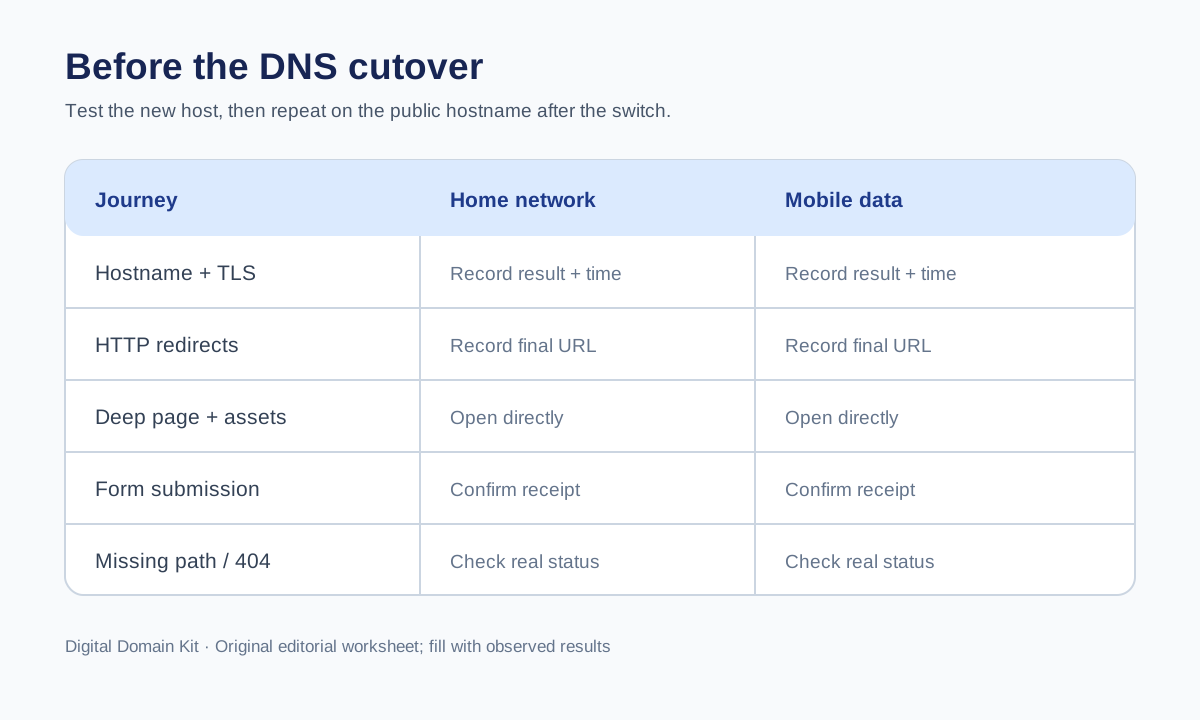
A website can look perfect from the developer’s laptop and fail for real visitors the moment DNS changes. The laptop may use a hosts-file override, be signed into an administrator account, have cached assets, or reach the new server through a corporate network that bypasses public protections. A cutover test should therefore answer a stricter question: will the new infrastructure serve the correct site for the real public hostname, from more than one ordinary network, without changing DNS for everyone yet?
This is a practical test plan for a small hosting move where the user-visible URLs stay the same. If the URLs themselves are changing, add a separate redirect mapping and migration review. The point here is to expose network, TLS, and application differences before the live DNS record directs traffic to the destination. Google’s hosting-change guidance explicitly recommends preparing and testing new infrastructure before changing DNS, then monitoring old and new traffic during the move.

Define what is moving
Write down the current origin or hosting provider, the new platform, the public apex and www hostnames, the CDN or reverse proxy in front of them, and which DNS records will change. Include both IPv4 and IPv6 if your site publishes A and AAAA records. Note whether a certificate is issued by the new host, by a CDN, or by both. This map prevents a common test failure: verifying the origin IP while forgetting that real visitors use the public hostname through a CDN.
Choose a limited set of critical journeys. A useful small-site set is the homepage, one deep content page, one tool or application page, one image or downloadable asset, a contact or signup form, and a deliberately missing path. Add login, checkout, or API requests if they are core to the site. The sample should include both cached and dynamic behavior. A homepage pass cannot tell you whether a form posts to the correct backend or a nested route returns a 404.
Use a safe prelaunch access method
The new host might provide a temporary hostname, a preview deployment, or an IP-restricted staging environment. Those methods are useful for testing content and application function, but they may not behave exactly like the final public hostname. Cookies, redirects, canonical tags, TLS certificates, CORS rules, and virtual-host routing depend on the requested hostname. Record which hostname each result used. Do not treat a temporary preview URL as full proof that www.example.com will work.
If your provider supports a controlled way to send the public hostname to the new IP for a tester only, use it with care and follow the provider’s instructions. A local hosts-file override, for example, can test the destination with the real hostname on one machine, but it can also hide what public DNS currently says. Document the override and remove it after the test. Do not publish that override as a broad user instruction, and do not claim it validates global DNS propagation.
Check that the new stack accepts the Host header and serves the right virtual host. An origin can return its default landing page when accessed by IP yet fail for the desired domain, or vice versa. Test HTTPS with the hostname that visitors will actually use. The SSL Checker can inspect a publicly reachable hostname after the relevant route is live, but a private prelaunch environment may require provider-specific tools. Do not assume a green certificate result for a temporary domain covers the final domain.
Choose genuinely different vantage points
Use at least two ordinary networks, such as a home broadband connection and a mobile data connection with Wi-Fi disabled. If possible, add someone outside your household or office. Two browser windows on the same router are not two networks. Separate vantage points can reveal CDN rules, IP allowlists, DNS cache differences, IPv6 routing problems, or provider incidents. Record the network type, approximate region, device, time, and public URL tested; do not needlessly collect private addresses or personal browsing details.
Before the cutover, the public DNS answer may still point to the old host. That is expected. Use the controlled prelaunch method for the new stack, and keep a separate record of what the public hostname currently does. Do not mix these results. Label one column “new host via preview/override” and another “current public DNS.” A screenshot without this distinction can lead a reviewer to believe the public cutover already happened.
Test the HTTP journey, not just the address
For each critical URL, record whether it loads, the response code, the final URL, and the main visible outcome. Use the HTTP Status Code Checker for publicly reachable test URLs and the Redirect Checker to document live redirect chains. When private preview access requires authentication, use an authorized local browser or server logs instead; the public tools cannot see inside a private environment.
Verify both http:// and https:// for the public hostname where applicable. The expected behavior might be one permanent redirect to HTTPS and then a 200 response, but sites vary. Watch for loops between the CDN and origin, repeated hops between apex and www, redirects back to the old host, or a final URL on a preview domain. A page can render in a browser after several invisible hops yet still signal a configuration problem.
Check the deliberately missing path. It should not return the homepage as 200 just because the new host has a catch-all route. A friendly error page with a real 404 is appropriate. This test catches default application routes that mask broken deep links. Also reload a nested content page directly rather than reaching it only through client-side navigation; single-page applications sometimes render internal navigation correctly while direct requests fail at the server.
Test assets, forms, and state
Inspect a representative image, stylesheet, script, and download. A migrated HTML page might reference assets on an old hostname that you plan to retire. Browser developer tools can show failed requests, mixed-content warnings, and CORS errors. For a form, submit a harmless test message through the normal interface and verify receipt in the intended destination. If the form sends email, note that DNS mail records may stay unchanged even while the website moves; application mail credentials and outbound network rules can still differ on the new host.
If sessions or logins matter, check a fresh session and an existing session where safe. Cookie domain, secure flags, key rotation, and server-side session stores can change across platforms. A test while already logged in as an administrator is not representative of a first-time visitor. For transactional sites, use a safe sandbox transaction rather than a real purchase unless the business owner has approved the test.
Check what search crawlers and visitors can see
Review the new site’s robots.txt, canonical URLs, page-level noindex instructions, and sitemap references. A staging copy may intentionally block indexing, but that block must not accidentally remain on the live host. Conversely, a public preview hostname should not become an accidental duplicate of production. Note whether the new environment is private, blocked, or canonicalized appropriately, and verify the final live state after cutover. Google’s site-move guidance includes testing accessibility and monitoring crawling after a hosting change.
Inspect the HTML actually returned for a deep page. A JavaScript-driven page can look populated after browser execution while the initial response is empty or points to stale metadata. This does not automatically make it unindexable, but it is worth comparing the old and new outputs. Avoid claiming “SEO safe” from a single tag check. The goal is to catch accidental environmental settings, not to guarantee indexing.
Make the cutover decision explicit
Before DNS changes, decide who can approve the move, what constitutes a blocking failure, and how long the old host will remain available. A broken homepage, invalid certificate for the public hostname, failed core form, or wrong redirect destination should block a normal cutover. Minor visual differences may be acceptable if documented and assigned, depending on the business. Write the decision down so the team does not debate severity while traffic is already moving.
Lowering relevant DNS TTL values ahead of time can reduce the window in which caches retain old answers, but it is not instantaneous and must be planned before the move. Keep both infrastructures able to serve traffic during the transition. Google’s guidance says to monitor requests to both old and new servers and shut down the old one only after traffic has stopped there and the new infrastructure is serving correctly. A propagation checker alone cannot authorize shutdown.
After DNS changes, repeat the matrix
Once the authoritative DNS values change, repeat the critical URL tests from the same two networks and compare with the pre-cutover record. Note which resolver answers each network receives. One network may still route to the old host because of caching; both hosts should be safe for that period. The DNS Propagation Check can show different public resolver views, while the website tests establish whether each visible route actually works.
Monitor origin and CDN logs, error rates, form submissions, and support messages. A low-traffic page may not appear in logs immediately, so test it deliberately. Keep a rollback path that identifies the exact old DNS records and confirms the old host is still usable. If rollback becomes necessary, do not expect every user to switch back instantly; caches apply in that direction too. Diagnose whether the issue is DNS, TLS, routing, content, or application state before changing a record again.
What this test cannot prove
Two networks are better than one, but they are not a census of the internet. Regional CDN edges, unusual ISP resolvers, accessibility conditions, and high-load behavior may still differ. A temporary preview hostname does not prove the final domain’s certificate or cookies are correct. A successful public response does not guarantee every form and background job works. State those limitations in the sign-off and keep monitoring after launch.
The value of the matrix is not that every box turns green. It is that each important assumption has an observable test and a named owner. A hosting move becomes much less mysterious when the team can show what worked on the new stack before DNS changed, what each network saw during transition, and what remained to be verified afterward.
Sources and scope
The sequencing and old/new traffic monitoring follow Google Search Central’s guidance for hosting changes without URL changes. A web-hosting discussion about previews before changing DNS illustrates the practical demand; the thread is not a substitute for provider documentation. Testing details depend on the actual hosting, DNS, and CDN providers. This is a site-owner workflow, not a guarantee that two vantage points detect every failure.