You are rebuilding a small website. The new design is ready, but the old site has URLs in search results, emails, bookmarks, and perhaps years of social posts. Which old address should lead to which new page? This is the part of a redesign that becomes painful only after launch, when a customer opens a familiar link and lands on the wrong service or a blank page.
This guide is for a site owner or small team changing a domain, platform, or URL structure. It gives you a manageable old-to-new URL map, a way to decide what to do with retired pages, and a post-launch test. It does not promise that search rankings will stay fixed: Google says a significant site move can cause fluctuations while pages are recrawled and reindexed. The work here is to make the move intelligible to people and crawlers, and to catch mistakes that you can actually correct.
Short answer: map the destination before you write a redirect rule
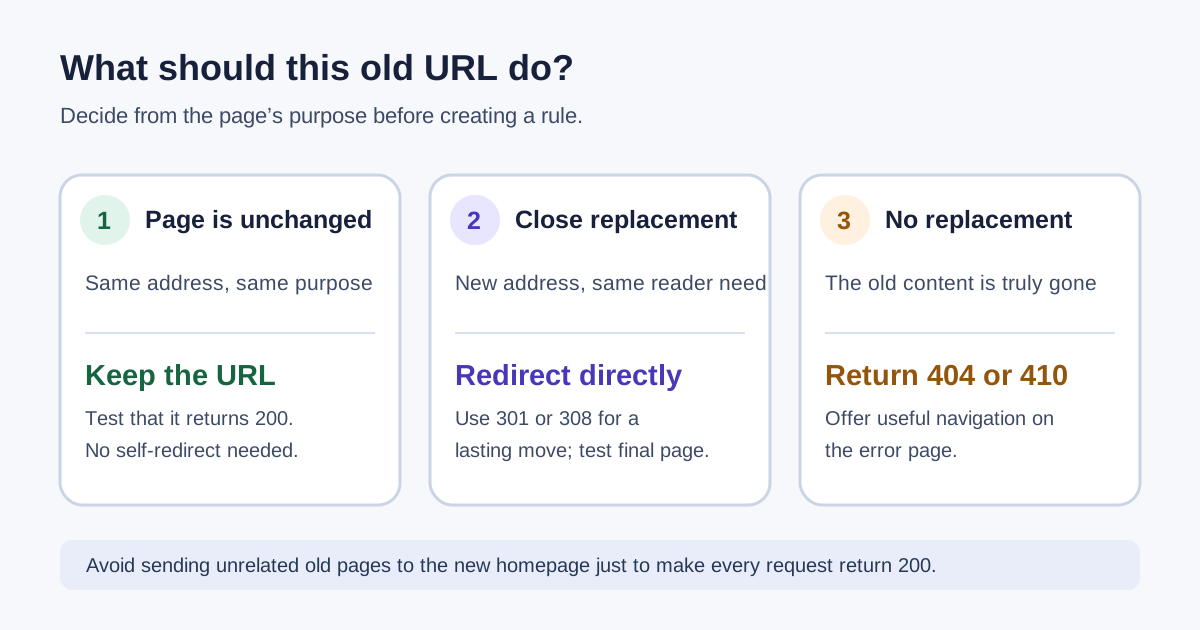
If a page has a close replacement, send its old URL directly to that replacement with a permanent server-side redirect. If the page still exists at the same URL, leave it alone. If it is gone and there is no useful equivalent, return a real 404 or 410 and provide helpful navigation on the error page. If the change is genuinely temporary, use a temporary redirect and document when it will end. Google's site-move guidance explicitly calls for a URL mapping and warns against sending many unrelated old pages to a single new homepage. Its redirect guidance distinguishes permanent from temporary moves.
Do the map even if you have only fifteen pages. At that size, a spreadsheet is faster than trying to remember what changed after the old site is gone. The decision checklist is short: identify the old URL; record whether it receives visits or has important links; identify the closest new content; choose keep, redirect, or retire; confirm the new target works; and assign someone to test the result.
First, decide what kind of move you are making
A domain switch from old.example to new.example can affect every path even when the page names stay the same. A platform switch may change path conventions: /services/web-design/ might become /web-design. A redesign with no URL changes should not acquire redirects merely because a new theme was installed. Write down the old and new hostnames, whether HTTPS or www behavior changes, and any sections that will be renamed. That gives you a clear boundary for testing.
Keep the number of simultaneous changes as small as practical. Google advises planning moves carefully and notes that site moves take time to process. A migration that changes domain, URL paths, content, navigation, and page purpose all at once is harder to diagnose if something goes wrong. You may still need to make those changes together, but your map should record each intended new destination so you can separate a routing problem from a content decision.
Build the old URL inventory
Start with URLs you can name without a crawler: homepage, main services, popular articles, contact page, and the pages linked from your navigation. Then add URLs from your current XML sitemap, analytics landing-page report, Search Console performance and indexing reports if you have access, and links you control in email templates or business profiles. A sitemap is a useful starting list, not proof that it contains every historic URL. Check old campaign links, PDF links, and paths seen in server logs if you have them.
Record complete URLs, including the hostname and path. That catches mistakes such as treating http://, https://, www, and a non-www host as if they were automatically the same. You can group predictable variants into a rule later, but the inventory should show which public form people actually use. Keep any query string only when it changes the content or is needed for a functioning destination; ordinary tracking parameters do not usually need their own editorial destination.
Choose the closest useful target
Read the old page's title and main purpose, then read the proposed new page. Ask: would a person who clicked the old link recognize that the new page answers the same need? A renamed service page normally has a clear equivalent. Two old articles consolidated into one substantial updated article may reasonably share a target. A discontinued offer that has no replacement should not be sent to the homepage just to avoid a 404. Google's guidance says not to redirect many old URLs to one irrelevant destination and explains that a removed page with no clear replacement can return a real not-found response.
Sometimes the closest target is a category page. Use it only if it helps the person continue the same task. A customer looking for a specific repair service might benefit from a new repairs overview that clearly lists successor services. They are less likely to benefit from a generic homepage with no mention of the service. Write a one-sentence reason for any many-to-one mapping. That note makes the choice reviewable by someone who did not build the site.
Make one row per old address
A URL map does not need special software. A spreadsheet with the fields below is enough for a small site. Put a single owner in charge of approving the target column. Otherwise developers may implement perfectly valid redirects to editorially wrong pages.
| Field | What to record | Why it matters |
|---|---|---|
| Old URL | Complete public address | Defines the exact request to test |
| New URL | Final address, or blank | Prevents guesswork at launch |
| Action | Keep, 301/308, 302/307, 404/410 | States the intended behavior |
| Reason | One sentence about content fit | Flags weak replacements |
| Priority | High, medium, or low | Directs limited test time |
| Verified | Date, result, and reviewer | Shows what was actually checked |
For example, https://old.example/services/repairs may map to https://new.example/repair-services because the offer remains available under a new name. An old event from five years ago with no successor may be marked retired. An existing /contact path that stays on the same domain and still works should be marked keep, not redirected to itself. These are planning examples, not live links or tested URLs.
Prioritize pages that people still reach. A broken contact or booking link can lose a customer immediately. An old high-traffic article can disappoint many readers. A forgotten test URL with no visitors or links may need only a normal not-found response. Priority does not mean you may ignore lower-volume pages; it gives you an order when you cannot test everything in the first hour.
Choose the response that matches the decision
For a lasting move, Google recommends a permanent server-side redirect where possible. 301 and 308 both signal a permanent move, while 302 and 307 signal a temporary one. The HTTP semantics standard explains the status codes and their handling. For ordinary page navigation, 301 is the familiar choice. If the old endpoint accepts form submissions or other non-GET requests, have the developer review method handling: 307 and 308 preserve the request method more explicitly than 302 and 301.
Put the redirect where the old URL can still be requested: the old host, application, web server, or edge service must remain capable of answering. A record in a new site's dashboard cannot redirect an old domain that no longer points to infrastructure you control. Keep the old domain registration and HTTPS certificate working while its URLs still need to redirect. Test both host variants that were publicly used. A redirect does not work for a browser that cannot connect to the old host in the first place.
Avoid redirect chains. If an old path first goes to the old homepage, then to a new homepage, then to a new service path, update the old rule to point straight to the final service path. Google's migration documentation advises redirecting directly to the final destination even though its crawler can follow multiple hops. Direct paths are also easier to debug and less fragile when one intermediate rule changes.
Use a not-found response when there is no successor
A helpful 404 page can explain that the content is gone and offer search or relevant navigation. The server must still send the real 404 status. Google's crawl-error guidance says a custom error page should return a 404; a friendly page that returns 200 can look like a soft 404. For deliberately removed content, 410 is another explicit not-found status in HTTP. Do not use a sitewide “all missing pages go home” rule. It hides broken links and makes it difficult to see which destinations you still need to decide.
Test the map before you switch traffic
Ask the implementer to load the draft redirect rules in a staging environment or another safe test setup. Check that each old path resolves to the planned target, that the target actually loads, and that the target page discusses the same topic. A browser address bar alone shows the end point but not the intermediate response codes, so use a redirect inspection tool for the chain.
Make a small test set even if automated checks will cover the full map: one common service page, one article, one retired page, the homepage, an old URL with a trailing slash, and any path with unusual capitalization or an encoded character. If the site serves forms or an API, add the affected endpoints and ask a developer to test their request methods separately. In the spreadsheet, mark each row pass or fail. Do not call a URL verified just because the rule was entered into a dashboard.
Watch for a rule that matches more than you intended. A broad pattern that captures /blog/* can send every article to a category page, even when the article has a direct successor. A default rule that changes http to https may create an extra hop when another rule also changes the domain. Keep general hostname rules simple, then test specific paths through the whole sequence.
Verify the public result after launch
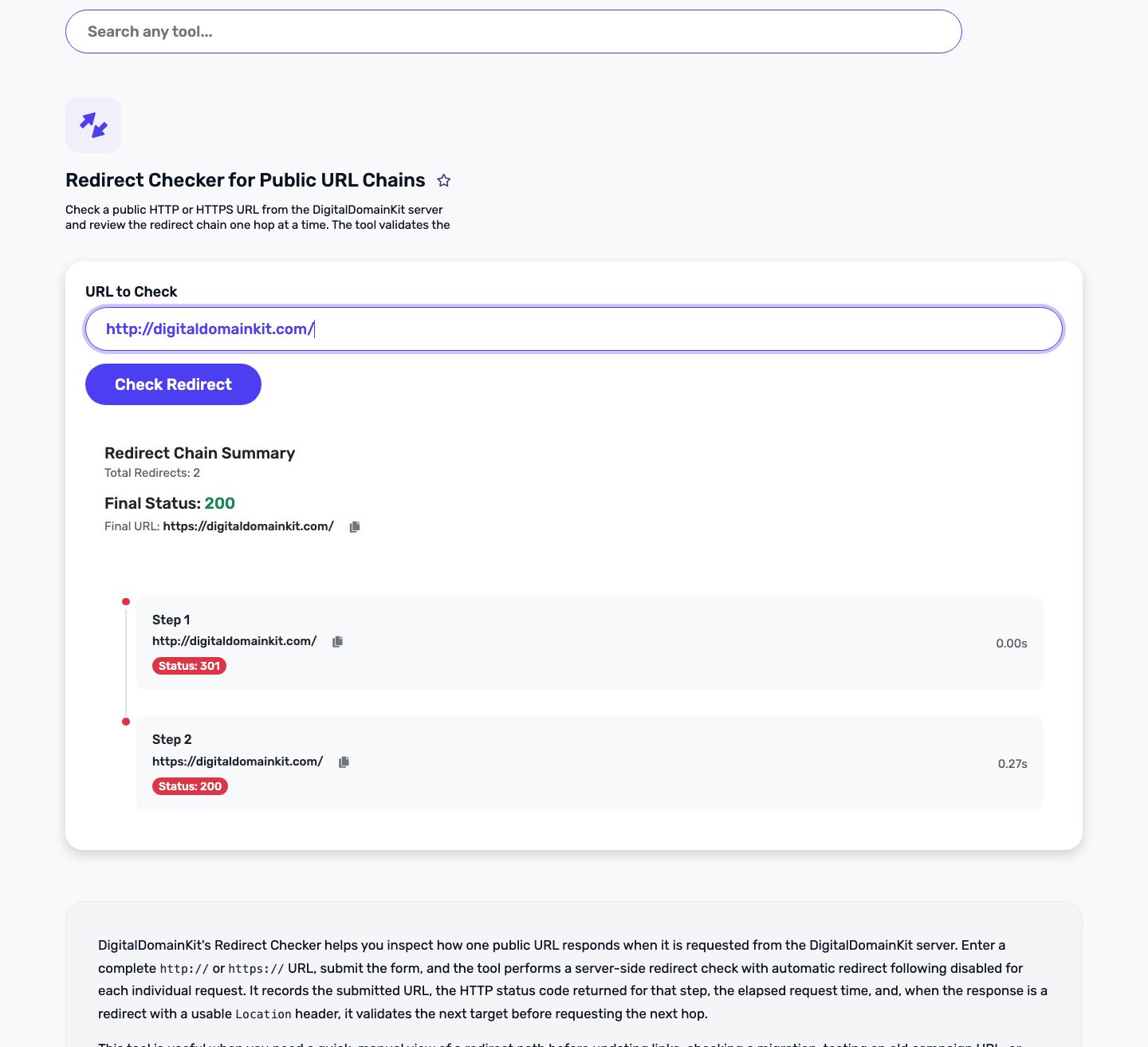
Open an old URL from the inventory in the Digital Domain Kit Redirect Checker. Look at every hop and the final URL. The screenshot below is a real check of our own public HTTP homepage moving to HTTPS; it illustrates how a redirect chain appears. It does not prove that a separate site's migration map is correct. For your migration, the final destination must match the row you approved, and the final page should return a successful response.
Next, test the final page itself with the Website Status Checker. A redirect can successfully land on a page that returns 404 or 500; checking only the first hop misses that problem. Open the page in a browser as a reader, too. A 200 response says the server delivered something, not that the content is the correct replacement.
Update internal links so your new site points straight to final URLs. Redirects are a safety net for outside links and bookmarks, not the preferred route for your own navigation. Update canonical tags, XML sitemap entries, and important links you control to the new addresses. Google's site-move documentation covers these steps and recommends monitoring the old and new properties during the move. Use Sitemap Visualizer to inspect the new sitemap for the URLs you expect, but remember that a sitemap is an inventory signal, not a live test of every page.
What tends to surprise small teams
A domain redirect can fail even when the rule is correct
If the old domain expires, its DNS stops resolving, or its HTTPS certificate no longer works, the visitor may never reach the redirect rule. Put renewal ownership in the migration plan. Keep a record of where old-domain DNS and redirect rules live, especially if an agency or former employee set them up. The redirect plan is an ongoing piece of site infrastructure, not a launch-day checkbox.
A homepage destination may look successful in a status report
A tool can show 301 followed by 200, and the route can still be wrong. If a specific old article now lands on the homepage, the protocol worked but the editorial mapping failed. Inspect the target's title and body against the old page's purpose. This is why the spreadsheet needs a reason column and a human reviewer.
Search changes are not a clean pass-or-fail signal on launch day
Google says recrawling and reindexing a moved site takes time and rankings can fluctuate. A short-lived change in a report does not, by itself, tell you which redirect is wrong. Use direct URL tests for immediate technical faults, then watch Search Console and analytics for patterns: old URLs still receiving traffic, new pages excluded unexpectedly, or important landing pages falling to a not-found response. Record the date of the launch so later reviewers can compare the right period.
Closing checklist
- Inventory the old public URLs from navigation, sitemap, reports, and important external placements you control.
- Give every old URL an explicit action and a content-based reason for its target.
- Review high-priority mappings with the person who knows what each page promised.
- Test the complete redirect path and final page status before and after launch.
- Correct chains, loops, unrelated homepage destinations, and redirects to error pages.
- Update new-site links, canonical URLs, and sitemap entries to point directly at final pages.
- Keep the old host and domain working while redirects are needed; monitor reports for missed paths.
Sources and review method
The practical question was informed by public Reddit discussions about small-site migrations and post-migration redirect mistakes, including a small-site migration question and a discussion of a bad migration. Those posts establish the reader problem; they are not evidence for search-engine behavior. Technical guidance was checked against Google's site-move documentation, redirect documentation, and RFC 9110, section 15.4. We inspected our public Redirect Checker result for an HTTP-to-HTTPS example. We did not test a third-party migration, provider account, or search ranking outcome.
If a source has changed or a step is unclear, use our contact page to report a correction. Tell us the guide title, the affected URL or statement, and the source that supports your update.