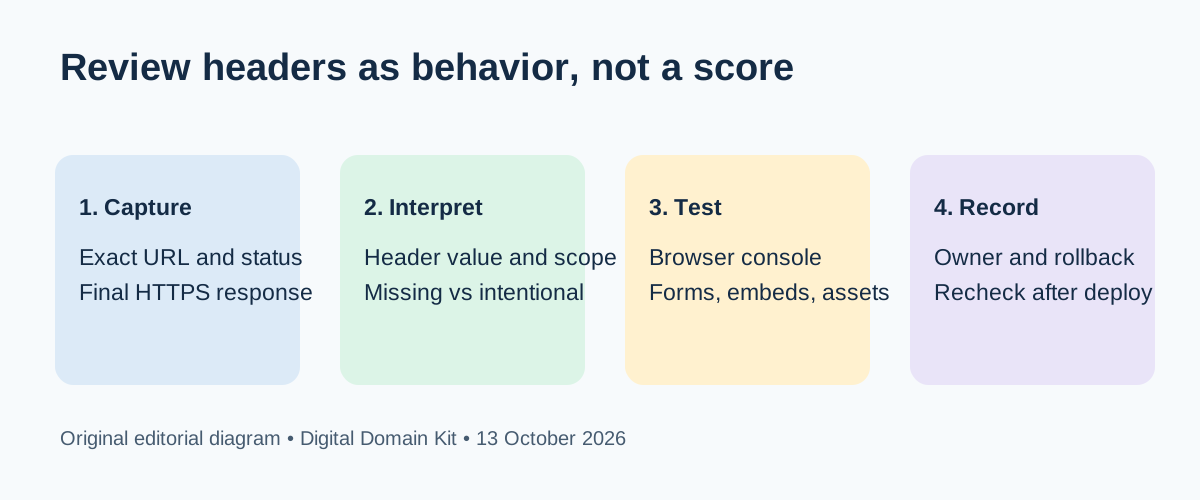
Your new site serves HTTPS, the contact form works, and a header scanner shows a row of warnings. Should you copy its suggested configuration into the web server and call the launch done? That is the wrong first move. A header is a browser instruction attached to a particular HTTP response. A scanner can show what it observed; it cannot know every script, form, embed, subdomain, or business workflow your site depends on. The useful job is to collect the live responses, decide what protection you need, test the affected flows, and keep a rollback path.
That distinction appears in real troubleshooting. A webdev question about HSTS asked where the policy actually belongs; another CSP implementation discussion described a working site losing form functionality when the policy changed. These threads suggest practical reader confusion, not a measure of how often any header fails. The guidance below relies on browser documentation for the technical behavior.
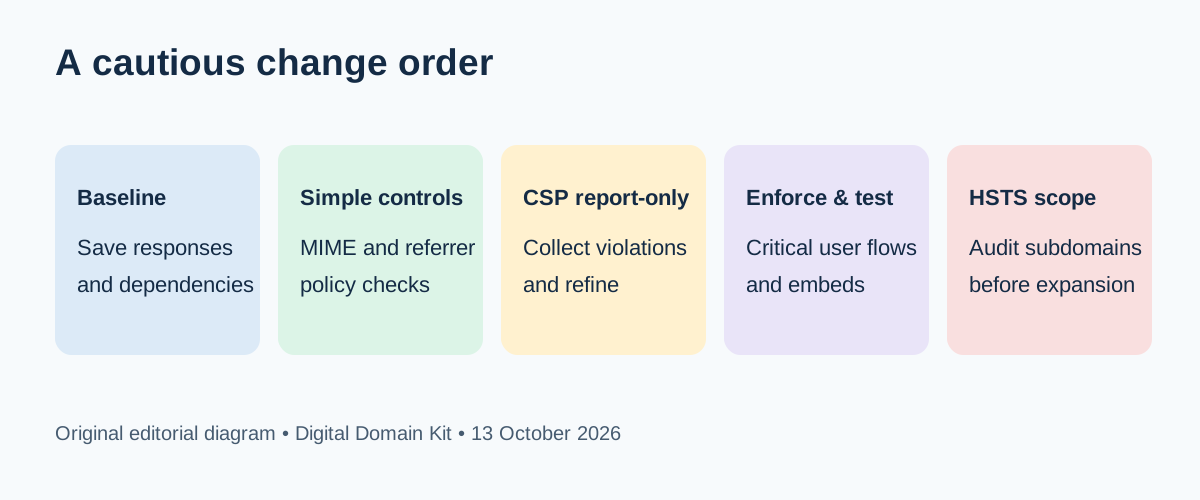
Short answer: Review the final HTTPS response for your homepage, a representative interior page, and any important subdomain. Fix obvious MIME-type mistakes and decide deliberately on referrer and framing behavior. Develop Content Security Policy (CSP) in report-only mode before enforcing it. Apply a long HSTS lifetime or includeSubDomains only after every affected host and certificate is ready for HTTPS. No grade can replace a tested user journey.
First decide what you are reviewing
Write down the exact URLs that matter: the canonical homepage, a form page, a page with third-party media, a download, and any public application subdomain. An HTTP response header may differ between the first redirect, the final HTML document, a static asset, and an error page. If you check only the homepage you can miss a CDN rule applying headers to one path but not another. Capture the date and final status for each URL. For a site behind a proxy, the browser-facing response is the one visitors receive, even if your origin server has a different configuration.
Run the Digital Domain Kit Security Headers & WAF Auditor against a public page you control. Treat its observations as a starting inventory, not an approval stamp. Compare with HTTP Headers Parser when you want to read a captured raw header block carefully. A terminal check can add the redirect path: curl -sSI https://example.com/ for one response, or curl -sSIL https://example.com/ to show redirects. Substitute a site you own. Some servers handle HEAD differently from a browser GET, so resolve disagreements by inspecting the Network panel for a normal page load.

Use a decision checklist, not a universal header bundle
For each proposed change, answer five questions. Which exact browser behavior do you want? Which pages and subdomains receive the policy? What existing resource or user journey could it block? Where is the header set—application, web server, CDN, or several layers? How will you detect a regression and roll it back? If you cannot answer those questions, keep the change in review. A copied configuration often contains directives appropriate for a different site, and duplicate layers can produce a final response that differs from either team's expectation.
| Policy | Decision to make | Failure to test |
|---|---|---|
X-Content-Type-Options: nosniff | Are JavaScript and CSS served with correct types? | Mislabelled assets stop loading. |
Referrer-Policy | How much URL detail should other sites receive? | Expected referral data changes. |
Content-Security-Policy | Which scripts, styles, connections, and frames are trusted? | Forms or embeds silently fail. |
Strict-Transport-Security | Are all affected hosts HTTPS-ready for the lifetime? | Visitors cannot bypass TLS errors. |
frame-ancestors | May partners embed your pages? | Legitimate embedding is blocked. |
This is a comparison of decisions, not a list of required values for every website. An application with payment widgets and video embeds has different CSP needs from a static brochure page. An organization with many legacy subdomains has a different HSTS rollout problem from a single-host site. The safest policy is the one that is correctly scoped, tested, and maintained, rather than whichever string gives the highest scanner score.
Check MIME handling before adding nosniff
MDN explains that X-Content-Type-Options: nosniff tells browsers to respect the declared media type. For scripts and styles, a mismatched type can cause a resource to be blocked. That is useful protection, but it may reveal a pre-existing configuration error. In developer tools, inspect a JavaScript and CSS response on the important pages: does the resource load, and is the Content-Type appropriate? If not, fix the type at the source or delivery layer, then test again with nosniff in place.
Do not conclude that every image, download, and script inherits the document response's header. Check the response that actually delivered the asset. A CDN can cache an earlier asset response or set a different header on a static-file path. Test both a cold load and a repeat visit after deployment. If a page suddenly loses styling or interaction, the browser console and Network panel usually tell you which asset was blocked; a homepage-only scanner may not.
Choose a referrer policy intentionally
A Referrer-Policy governs how much of the referring URL the browser sends with outgoing requests. MDN documents the values and notes that strict-origin-when-cross-origin is the default in current browsers: same-origin requests can receive the full URL, cross-origin HTTPS requests receive the origin, and a downgrade to HTTP receives no referrer. Some sites choose a stricter no-referrer policy; others need origin-level attribution. The correct choice depends on privacy, analytics, integrations, and link behavior.
Do not treat referral counts changing after a policy change as proof of lost visitors. The browser may be sending less detail while the navigation still succeeds. If analytics, an affiliate flow, or a partner integration relies on referrer data, test that dependency openly. Do not put sensitive tokens in URLs and then rely on this header alone to protect them. If you change the policy, record the expected analytics effect so later editors do not misread a measurement discontinuity as an SEO event.
Develop CSP with real pages and report-only mode
CSP is powerful because it constrains which resources a page may load and, with frame-ancestors, which sites may embed it. It is also easy to break a site with a guessed list of sources. MDN's CSP guide describes Content-Security-Policy-Report-Only, which asks the browser to report violations without enforcing the proposed restrictions. Start with an inventory of actual scripts, styles, frames, images, fonts, and network calls from representative pages. Identify the owner of each external domain rather than copying every observed domain into an allowlist.
Then send a candidate policy in report-only mode and test real journeys: submit a form, use search, authenticate if applicable, complete a purchase if applicable, load a video, and open embedded content. Inspect browser console messages and collected reports. Reports can contain noise from extensions and old clients; verify a reported violation against a reproducible page behavior before weakening the policy. A monitoring endpoint must be operated securely and with appropriate privacy handling because report contents can include page details. Once a policy reflects the actual site, enforce it on a small, reversible scope, then retest.
A report-only policy is not a security control while it is only reporting; it is a development instrument. Conversely, an enforced policy that breaks a checkout or contact form is not a successful launch. Avoid broad shortcuts such as allowing every source merely to silence the console. Document why each exception exists and remove it when the dependency goes away. For framing specifically, frame-ancestors 'none' is suitable only if nobody should embed the page. If your site intentionally embeds a page elsewhere, choose and verify a more precise rule.
Roll out HSTS with the whole hostname inventory in view
MDN describes HSTS as a browser instruction to use HTTPS on future visits to a host. It is accepted from an HTTPS response, not an insecure HTTP response. After a browser learns the policy, it cannot click through a certificate error for that host. The optional includeSubDomains extends the rule below that name. The optional preload path has further requirements and a longer operational commitment. These are reasons to plan the rollout, not reasons to avoid HTTPS.
Before choosing a long max-age, verify the canonical host, www, application subdomains, staging names if public, and any delegated hosts that would fall under includeSubDomains. Use the SSL Checker for public certificate observations, then check critical flows in a browser. A certificate that works today still needs a renewal owner. If one legacy host cannot serve HTTPS, do not enable broad subdomain scope until that dependency is fixed or retired. Start with a short, reversible duration where appropriate, verify the experience, and increase only after the environment has proven stable.
What a header scan cannot prove
A scan cannot prove a site is free of vulnerable dependencies, that secrets were never exposed, that the application checks authorization, or that third-party scripts are trustworthy. It cannot determine whether a broad CSP allowlist is useful, whether HSTS includes every host you intend, or whether a blocked resource matters to a rarely visited workflow. It also may report a missing header on a redirect response where the browser's final document behavior is the important question. Use the tool for a repeatable observation, then investigate the behavior that observation implies.
Keep a small change log: tested URL, response status, header value, layer that set it, date, owner, user journeys exercised, and rollback action. Re-run the same checks after CDN, framework, theme, plugin, or hosting changes. If a scanner result changes unexpectedly, compare the final response and deployment history before adding another layer of configuration. A clean record makes a future incident faster to explain and prevents a well-meaning editor from deleting a deliberate policy.
Final review checklist
- Capture the final HTTPS response and redirect chain for representative pages and hosts.
- Confirm where each header is set and whether the browser-facing value matches the intended one.
- Verify MIME types before relying on
nosniff; test real scripts and styles. - Choose referrer and framing behavior based on actual site dependencies.
- Develop CSP in report-only mode, then enforce and test critical journeys.
- Check every affected hostname and certificate before lengthening HSTS or adding
includeSubDomains. - Record the change, owner, rollback, and a post-deployment recheck.
Sources and review method
Reviewed October 13, 2026. Technical behavior was checked against MDN's CSP guide, HSTS reference, MIME-sniffing header reference, and referrer policy reference. Reddit threads were used only to identify confusing decisions. We did not test a hosting account, apply a policy to your site, or claim a scanner grade for any third-party property. The diagrams are original editorial explanations, not captured interfaces.
If a cited behavior has changed or a step is unclear, please send a correction with the URL, header value, browser, and date. Never send account secrets or private dashboard captures.